
Our Short List of 3

- Best for: Singers and guitarists who already own a microphone and headphones and want a simple two-input setup.
- 2-in / 2-out USB-C audio interface
- Two Focusrite 4th-generation mic preamps
- 69 dB preamp gain range

- Best for: Solo recordists who mix on headphones or monitors and care about output quality.
- 2-in / 2-out USB-C audio interface
- ESS Sabre32 DAC
- Mic preamp EIN of -129 dBu (maker figure)
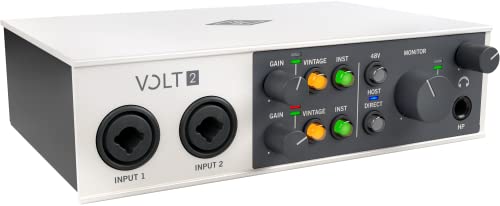
- Best for: Singers who want tube-style warmth printed while tracking vocals or acoustic guitar.
- 2-in / 2-out USB audio interface
- Vintage preamp mode with tube-preamp voicing
All 4 Picks at a Glance
| Product | Specs | Action |
|---|---|---|
| Focusrite Scarlett 2i2 4th Gen |
| Check price on Amazon |
| MOTU M2 |
| Check price on Amazon |
| Universal Audio Volt 2 |
| Check price on Amazon |
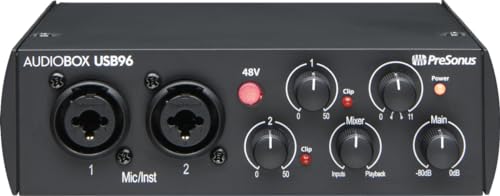 PreSonus AudioBox 96 25th Anniversary |
| Check price on Amazon |
Our Top Picks
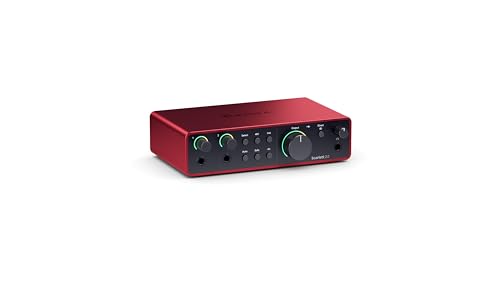 Focusrite Scarlett 2i2 4th Gen USB-C Audio Interface7.09 x 3.9 x 1.79 Inches1.73 poundsCheck on Amazon
- MOTU M2 USB-C Audio Interface7.5 x 4.25 x 1.75 inches7.5 x 4.25 x 1.75 inches1.3 poundsCheck on Amazon
An audio interface is the piece of home-studio gear you will use every single session, so the real decision in this price bracket is not which box has the longest feature list. It is which two-input design matches the way you record: one microphone and one instrument at a time, two microphones together, or a keyboard rig that also needs MIDI. All four interfaces here are two-input USB models, and the differences that matter are preamp gain, converter design, monitoring feel and the small extras like a vintage voicing switch or bundled recording software.
The picks below serve home recordists who track vocals and guitar, podcasters and streamers who need clean gain for one voice, and small project-studio owners adding a reliable second interface. Each model was chosen from the name and specifications on its product page: input and output counts, connection type, preamp details and stated extras, so the comparison stays grounded in what each manufacturer actually lists.
Quick Picks
As an Amazon Associate we earn from qualifying purchases
| Product | Best for | Key spec from title |
|---|---|---|
| Focusrite Scarlett 2i2 4th Gen | Singers and guitarists | 69 dB preamp gain range |
| MOTU M2 | Careful headphone mixing | ESS Sabre32 DAC |
| Universal Audio Volt 2 | Warm vocal takes | Vintage preamp mode |
| PreSonus AudioBox 96 25th Anniversary | Keyboard rigs and beginners | MIDI in and out |
How to Choose
Count Your Inputs and Check the Connection
Every interface in this roundup is a two-input design, which suits one singer with a guitar, a pair of microphones on an acoustic instrument, or a voice plus a line-level source. Count the sources you truly record at the same time before anything else, because two inputs fill up fast once a second person joins. Also check the connection: USB-C models plug straight into modern laptops, while a USB 2.0 design may need the right cable for newer ports. Confirm your computer’s ports and your recording software’s requirements before ordering, and leave headroom if guests or stereo sources are likely.
Judge the Microphone Preamps by Gain and Noise
A quiet microphone preamp matters most when you record soft voices, fingerpicked guitar or a dynamic microphone that needs plenty of gain. Look at the stated gain range: a wider range lets one preamp handle both a sensitive condenser and a low-output dynamic without strain. Noise figures such as EIN tell you how clean that gain stays at high settings, though makers measure them under their own conditions, so treat them as a guide rather than an absolute ranking. If you use a condenser microphone, also confirm the interface supplies phantom power on its microphone inputs.
Look at the Converters, Not Just the Sample Rate
Converters turn your performance into digital audio and back again for monitoring, so their quality shapes everything you hear. A stated design such as an ESS Sabre32 DAC signals a maker investing in the output stage, which matters if you mix on headphones or monitors connected to the interface. Sample-rate support is the other half: 24-bit recording at up to 96 kHz gives editing headroom for pitch and timing work. For most home recording, clean conversion at standard rates matters more than chasing the highest number on a specification sheet.
Weigh the Extras That Change Your Routine
The extras decide how an interface fits your daily routine. MIDI input and output matter if you play a keyboard controller or hardware synth that predates USB MIDI. A voicing switch, such as a vintage preamp mode, adds tube-style color at the tracking stage for singers who like a warmer take printed on the way in. Bundled recording software can save a beginner from buying a separate program, but check which edition is included and whether your computer meets its requirements. None of these extras replaces solid preamps and converters, so weigh them last.
The 4 Best Options
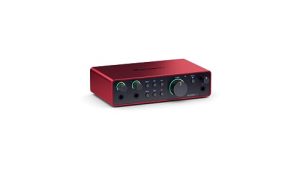
Focusrite Scarlett 2i2 4th Gen
- Best for: Singers and guitarists who already own a microphone and headphones and want a simple two-input setup.
- 2-in / 2-out USB-C audio interface
- Two Focusrite 4th-generation mic preamps
- 69 dB preamp gain range
Singers and guitarists who already own a microphone and headphones and want a simple two-input setup.
This listing is the interface only, with no microphone or headphone bundle included.
The Scarlett 2i2 4th Gen is the straightforward choice for singers and guitarists who record one or two sources at a time. Its two fourth-generation Focusrite microphone preamps offer a listed 69 dB gain range, which gives low-output dynamic microphones enough clean level without pushing the preamp to its limit, and the USB-C connection keeps setup simple on current laptops. Because this listing is the interface on its own, it suits buyers who already own headphones and a microphone and simply want the current Scarlett front end for a compact home setup.
MOTU M2
- Best for: Solo recordists who mix on headphones or monitors and care about output quality.
- 2-in / 2-out USB-C audio interface
- ESS Sabre32 DAC
- Mic preamp EIN of -129 dBu (maker figure)
Solo recordists who mix on headphones or monitors and care about output quality.
It stays a two-input design, so recording a full band or several guests at once is beyond its layout.
The MOTU M2 stands out for buyers who care about what they hear while they mix. Its ESS Sabre32 DAC feeds the outputs, a converter design more often discussed in higher-end gear, and MOTU states a microphone preamp EIN of -129 dBu, a figure that points to quiet gain for soft sources when taken as the maker’s own measurement. The M2 keeps the same two-input, two-output layout as the rest of this group, so it fits solo recordists who monitor carefully on headphones or nearfield speakers.
Universal Audio Volt 2
- Best for: Singers who want tube-style warmth printed while tracking vocals or acoustic guitar.
- 2-in / 2-out USB audio interface
- Vintage preamp mode with tube-preamp voicing
Singers who want tube-style warmth printed while tracking vocals or acoustic guitar.
The Vintage mode is a single voicing switch, so buyers wanting many tonal flavors will still lean on their recording software.
The Volt 2 is built for singers who like character in a vocal take. Its Vintage preamp mode applies a tube-preamp voicing at the input, so a voice or acoustic guitar can pick up a warmer tone while tracking instead of relying on processing afterwards. Outside that switch, it is a plain two-input, two-output USB interface, which keeps the learning curve low for someone setting up a first home studio. Choose it when the voicing option is the feature you will actually use every session, rather than a novelty tried once and forgotten.
PreSonus AudioBox 96 25th Anniversary
- Best for: Keyboard players and beginners who want MIDI ports and recording software in the box.
- 2×2 USB 2.0 audio interface
- 24-bit / 96 kHz recording
- MIDI in and out
- Studio One Artist software bundled
Keyboard players and beginners who want MIDI ports and recording software in the box.
The USB 2.0 connection may need an adapter or the right cable on laptops with only newer ports.
The AudioBox 96 25th Anniversary edition is the pick for keyboard players and anyone whose rig still speaks MIDI. Alongside its two inputs and two outputs, it carries MIDI in and out for connecting older controllers and hardware, and it records at 24-bit and up to 96 kHz. PreSonus also bundles its Studio One Artist recording software, which gives a first-time buyer a complete path from unboxing to a finished track without a separate software purchase. The connection is USB 2.0 rather than the newer plug style.
Which One Fits Your Situation
Recording Vocals and Guitar at Home
If your sessions are one voice and one guitar, recorded together or in layers, any of these two-input models covers the job, and the choice turns on preamp gain for your microphone. A low-output dynamic microphone benefits from the Scarlett’s wide listed gain range, while a singer chasing a warmer printed tone should look at the Volt 2 and its Vintage mode. Keep the setup simple: two inputs, a closed-back headphone and your usual recording software.
Tracking a Voice for Podcasts or Streams
Podcasters and streamers usually record a single voice, so clean, quiet gain matters more than input count. The MOTU M2’s maker-stated noise figure suits a treated room and a soft-spoken delivery, and its converter design helps when you edit and monitor long episodes on headphones. If your show sometimes brings in a co-host, the second input on any model here takes a second microphone without new hardware.
Building a Small Keyboard Rig
If a hardware keyboard, synth or older controller sits at the center of your setup, MIDI ports narrow the field quickly. The AudioBox 96 connects that gear directly while still recording audio at 24-bit and up to 96 kHz, and its bundled Studio One Artist software gives the rig a recording home straight away. Players whose controllers already use USB MIDI can ignore the ports and choose on preamps and converters instead.
Adding a Second Interface to a Project Studio
A project studio that already has a main interface may need a small, dependable box for a writing corner, a voice booth or location recording. Two-input models travel well and set up fast, and the differences here are practical: USB-C for the newest laptops, a voicing switch for quick vocal color, or bundled software for a collaborator starting from nothing. Match the spare interface to the computer it will live with, and it will earn its place.
Common Mistakes
- Buying a bundle listing by mistake when you only need the interface itself, or expecting extras that a bare interface listing never included.
- Choosing by the highest sample-rate number instead of preamp gain and converter quality.
- Forgetting to check whether your microphone needs phantom power and whether the interface provides it.
- Ignoring the connection type and discovering your laptop needs a different cable or adapter.
- Planning a three-person recording around a two-input interface and finding out on session day.
Frequently Asked Questions
How many inputs do I need for recording vocals and guitar?
Two inputs cover the common home setups: a microphone and a guitar at the same time, or two microphones on one instrument. If you always record one source at a time and overdub the rest, two inputs still leave room for a guest. Only step beyond this class if you regularly record several people or a full drum kit at once.
Does a higher sample rate make my recordings sound better?
Not by itself. Recording at 24-bit and up to 96 kHz gives headroom for editing, pitch correction and effects, which is why the AudioBox 96 lists it. Microphone placement, room sound and preamp gain shape the result far more. Clean conversion at standard settings beats a big specification number paired with a noisy room or a microphone pushed too hard.
What does the Vintage mode on the Volt 2 actually do?
It is a voicing switch on the microphone preamp that applies a tube-style tone while you record, so the warmth is printed into the take rather than added later with software. It suits singers who know they like that color on their voice. It does not add inputs or change the converter, so judge the Volt 2 as a two-input interface first.
Can I use one of these interfaces for podcasting with two hosts?
Yes, as long as each host has a microphone and you record both inputs at once. Set gain for the louder voice first, then balance the second, and monitor on headphones so neither speaker clips the converter. If your show grows to three or four regular voices, you will need an interface with more microphone inputs than this class offers.
More from Amazon
Programs that pair well with the guide above. Offers and eligibility are set by Amazon and may change.
Free shipping on eligible items, Prime Video and more. Eligible new members can start with a free trial.
Start a Prime free trialAudiobooks and podcasts to listen to on the go. Eligible new members can start with a free trial.
Try Audible freeAd-free music streaming. Eligible new subscribers can start with a free trial.
Try Music Unlimited freeA free business account with business pricing and bulk-buying tools for work, shop or home office.
Create a business accountAs an Amazon Associate we earn from qualifying purchases.
Write Your Review
No reviews yet. Be the first to share your experience!