
Our Short List of 3
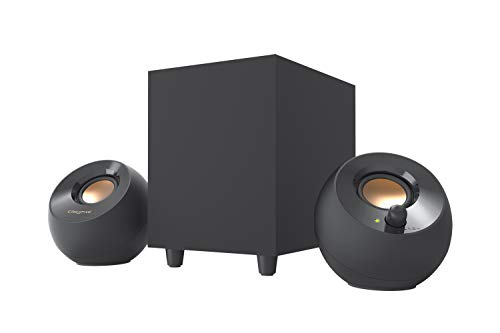
- Best for: Laptop desks with no spare wall outlet.
- Configuration: 2.1 desktop speaker system
- Total power: 8W RMS
- Subwoofer: 4-inch down-firing driver
- Satellite drivers: 2-inch far-field drivers, angled at 45 degrees
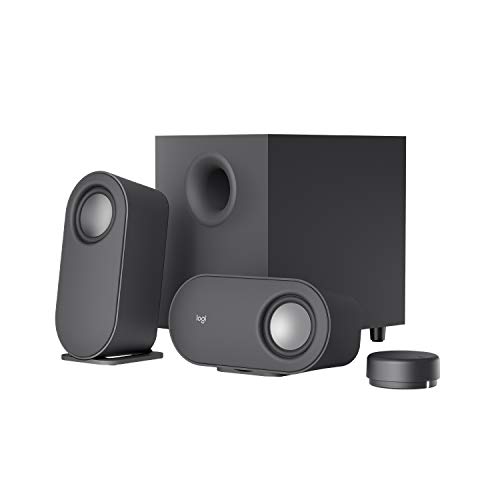
- Best for: Desks juggling a computer, a phone and a console.
- Configuration: 2.1 system with two satellites and a subwoofer
- Total power: 80W peak, 40W RMS
- Subwoofer output: 20W, ported and down-firing
- Inputs: Bluetooth, micro USB and 3.5 mm

- Best for: Film and game sound at a fixed desktop.
- Configuration: 2.1 THX-certified computer speaker system
- Woofer diameter: 6.5 inches
- Inputs: 3.5 mm input
- Extra socket: Headphone jack on the control pod
All 5 Picks at a Glance
| Product | Specs | Action |
|---|---|---|
| Creative Pebble Plus |
| Check price on Amazon |
| Logitech Z407 |
| Check price on Amazon |
| Klipsch ProMedia 2.1 |
| Check price on Amazon |
 Creative Pebble X Plus |
| Check price on Amazon |
 Bose Companion 2 Series III |
| Check price on Amazon |
Key takeaways
- Five desktop speakers with a stated 3.5 mm input, from USB-powered pairs to a THX-certified 2.1 system, compared on inputs, power, controls and desk fit.
Plenty of sources still speak only through a headphone jack: older laptops, handheld consoles, portable CD players, small TVs and the spare phone in a drawer. Bluetooth cannot help those devices, and many newer speakers have dropped the wired socket entirely. A stated 3.5 mm input is therefore the first thing to verify, before power figures or cabinet style enter the discussion at all.
This roundup is for desk listeners in five situations: the laptop user out of USB ports, the gamer with several wired sources, the film watcher wanting a subwoofer, the tidy minimalist, and the buyer who keeps a second device permanently plugged in. Every pick below is a desktop speaker system whose listing states a 3.5 mm aux input.
Quick Picks
As an Amazon Associate we earn from qualifying purchases.
| Product | Best for | Key spec from title |
|---|---|---|
| Creative Pebble Plus | USB-powered desks short on outlets | 2.1 system with 3.5 mm AUX-in and down-firing subwoofer |
| Logitech Z407 | Switching between three desk sources | 80W peak system with Bluetooth, USB and 3.5 mm inputs |
| Klipsch ProMedia 2.1 | Films and games needing real bass weight | THX-certified 2.1 system with 3.5 mm input |
| Creative Pebble X Plus | A lit desk setup with newer USB-C gear | 2.1 USB-C system with 3.5 mm AUX input and RGB lighting |
| Bose Companion 2 Series III | Two wired devices connected at once | Multimedia pair with 3.5 mm AUX and PC inputs |
How to Choose
Confirm the socket is an input, not only a headphone jack
Many speaker listings mention a 3.5 mm connection without saying which direction it runs. A headphone jack sends sound out for private listening, while an aux input receives sound from a phone, console or player, and the two are not interchangeable. Read the connectivity line of the listing and look for wording such as AUX-in, aux input or line-in tied to the speaker itself. Check the port diagram as well, because a single rear socket sometimes serves the computer connection only. Every system in this roundup states a 3.5 mm input in its listing, which is the requirement that defines the category.
Decide whether a subwoofer earns its floor space
A separate subwoofer changes both the sound and the furniture plan. Three systems here include one, and each needs floor or under-desk room plus a cable run back to the satellites, so measure the space before assuming it fits beside a desk leg or a PC tower. Two-piece pairs avoid that entirely and sit wholly on the desktop, which suits shallow shelves and shared workspaces. The trade is low-frequency weight: film effects, game rumble and electronic music all lean on the larger driver a subwoofer provides, while speech, podcasts and acoustic tracks ask far less of it.
Count the sources you will actually connect
A single aux input is enough when one computer does everything, yet it becomes a daily cable swap once a console, a work laptop and a phone all want the same speakers. Some systems here add Bluetooth or USB audio alongside the wired socket, letting several sources stay connected and take turns. Others take the opposite route and provide two wired inputs, so a computer and a second device remain plugged in simultaneously. Think about which pattern matches your desk: wireless convenience for rotating gadgets, or a second cable that never moves once it is installed behind the monitor.
Match the power supply to your desk wiring
How a speaker system feeds itself shapes the whole setup. One pick here draws power over USB and needs no wall outlet at all, which helps desks where every socket already serves a monitor, a charger and a lamp. Another raises its output when fed by a stronger USB power adapter, so the supply you choose changes the result. The remaining systems use conventional mains power through an adapter or a cord, freeing USB ports but adding a brick to the cable tray. Check what your desk can offer before choosing, rather than discovering a shortage during installation.
The 5 Best Options
Creative Pebble Plus
- Best for: Laptop desks with no spare wall outlet.
- Configuration: 2.1 desktop speaker system
- Total power: 8W RMS
- Subwoofer: 4-inch down-firing driver
- Satellite drivers: 2-inch far-field drivers, angled at 45 degrees
Laptop desks with no spare wall outlet.
USB power limits total output, so large rooms will outgrow it.
The Pebble Plus suits a desk where outlets are scarcer than USB ports. It is powered entirely over USB and takes its audio through the 3.5 mm AUX-in cable, so one laptop connection covers both jobs. Two far-field drivers angled upward toward the listener handle the stereo image, while a separate down-firing subwoofer supplies the low end that small satellites usually miss. A front-facing volume knob on the right speaker keeps level adjustments within reach, and a high gain mode is provided for quieter sources. It is the simplest route here to a 2.1 wired setup without touching a wall socket.
Logitech Z407
- Best for: Desks juggling a computer, a phone and a console.
- Configuration: 2.1 system with two satellites and a subwoofer
- Total power: 80W peak, 40W RMS
- Subwoofer output: 20W, ported and down-firing
- Inputs: Bluetooth, micro USB and 3.5 mm
Desks juggling a computer, a phone and a console.
The subwoofer and dial need desk and floor room of their own.
The Z407 is built for a desk that hosts several sources at once. It connects through Bluetooth, micro USB or the 3.5 mm input, and up to three devices can stay attached while you switch between them. Two oval satellites can stand vertically or lie horizontally under a monitor, and a ported down-firing subwoofer handles the bass duties with digital signal processing keeping it controlled. Control comes from a wireless dial that adjusts volume, bass, play and pause from across the room, which suits a desk that doubles as a media corner. The graphite finish and fabric-free design keep the system looking like office equipment rather than a gaming accessory.
Klipsch ProMedia 2.1
- Best for: Film and game sound at a fixed desktop.
- Configuration: 2.1 THX-certified computer speaker system
- Woofer diameter: 6.5 inches
- Inputs: 3.5 mm input
- Extra socket: Headphone jack on the control pod
Film and game sound at a fixed desktop.
Wired-only connection means no wireless streaming option at all.
The ProMedia 2.1 is the long-running heavyweight of this group, a THX-certified three-piece system designed around desktop films and games. Its satellites use horn-loaded tweeter technology drawn from the brand’s larger speakers, and a side-firing subwoofer with a 6.5-inch driver gives the system the deepest bass hardware in this roundup. Connection is deliberately old-school: a 3.5 mm input links it to practically any computer, console controller or player, and a headphone jack on the control pod covers private listening. There is no Bluetooth and no USB audio, so every source arrives by cable, which purists will count as a feature rather than a gap.
Creative Pebble X Plus
- Best for: USB-C gaming and creator desks that still own wired gear.
- Configuration: 2.1 USB-C computer speaker system
- Total power: Up to 15W RMS from a PC USB-C port, up to 30W RMS with a USB PD adapter
- Drivers: 2.75-inch full-range drivers with a 3.5-inch subwoofer
- Inputs: USB audio, Bluetooth 5.3 and 3.5 mm AUX input
USB-C gaming and creator desks that still own wired gear.
Full output needs a suitable USB PD adapter, which is not included.
The Pebble X Plus takes the Pebble formula toward newer desks. It runs from a USB-C connection for both power and audio, streams over Bluetooth 5.3, and still keeps an analog path through its 3.5 mm AUX input for older hardware. Larger 2.75-inch full-range drivers pair with a compact cube subwoofer, and output rises when the system is fed by a USB power delivery adapter instead of a computer port. Customizable RGB lighting rings the satellites for buyers building a lit setup, and app-based sound adjustments are available when connected to a PC. It is the most feature-dense system here, aimed squarely at a modern gaming or creator desk.
Bose Companion 2 Series III
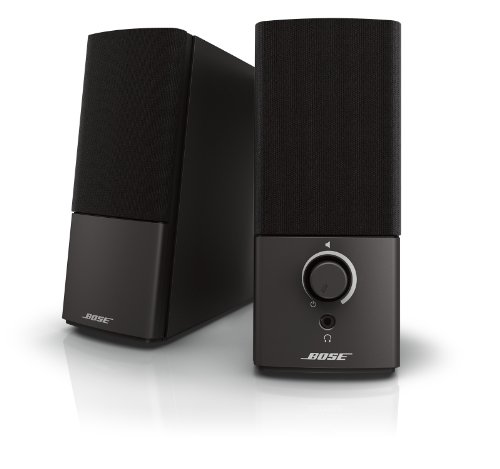
- Best for: A computer plus one extra wired device on a small desk.
- Configuration: 2.0 multimedia speaker pair
- Inputs: 3.5 mm AUX input and PC input
- Front controls: Volume control and headphone jack on the right speaker
- Included: Audio input cable, speaker cable and AC power pack
A computer plus one extra wired device on a small desk.
No subwoofer and no wireless input, so bass and streaming stay limited.
The Companion 2 Series III keeps things to two speakers and two wired inputs. A PC input and a separate auxiliary input sit on the right speaker, so a computer and a phone, tablet or CD player can both stay connected without swapping cables, and the listing names the auxiliary socket as a 3.5 mm connection. A volume control and a headphone jack sit on the front of the right speaker for quick adjustments and private listening. There is no subwoofer, no Bluetooth and no remote, which keeps the footprint small and the operation obvious. It fits desks where simplicity and a second wired source matter more than bass hardware.
Which One Fits Your Situation
Your desk has no free wall outlet
Choose the Creative Pebble Plus. Because it draws power over USB and receives audio through its aux cable, a single laptop feeds and drives the whole 2.1 system. That frees the power strip for monitors and chargers, and the front volume knob means you are not reaching behind the desk to change level. It is the only pick here that removes mains power from the equation entirely.
You switch between work and play sources all day
The Logitech Z407 matches a desk where a laptop, a phone and a console rotate through the same speakers. Bluetooth, USB and the 3.5 mm input can all stay connected, and the wireless dial handles switching tasks like volume, bass and track control without opening settings on each device. Lay the satellites flat under the monitor if vertical space is tight.
You want cinema weight from a fixed gaming desk
Pick the Klipsch ProMedia 2.1. THX certification, horn-loaded satellites and the largest subwoofer driver in this group make it the natural choice for films and games at one permanent desk. The wired-only design bothers nobody whose sources never move, and the control pod headphone jack handles late-night sessions. Just confirm the floor space beside the desk before ordering.
You keep a second wired device permanently connected
The Bose Companion 2 Series III solves the two-device problem without any wireless pairing. Its PC input and auxiliary input let a computer and another source share the pair, and the front headphone jack covers quiet hours. Buyers with a USB-C gaming desk and older wired gear alongside it should look at the Pebble X Plus instead, which adds Bluetooth and USB audio to the same aux socket.
Common Mistakes
- Assuming every modern speaker still has an aux socket, when many current models have removed it entirely.
- Confusing a headphone output with a 3.5 mm input and discovering the direction only after the speakers arrive.
- Buying a 2.1 system before measuring the floor or under-desk space its subwoofer needs.
- Expecting USB-powered speakers to fill a large room, when their supply limits total output.
- Forgetting that two connected wired sources may need volume managed at the source devices themselves.
Frequently Asked Questions
Does a 3.5 mm input work with devices that have no Bluetooth?
Yes, that is exactly the job it does. Any source with a headphone jack or a line-out socket, including older laptops, handheld consoles, portable disc players and small TVs, can feed these speakers through a standard stereo cable. No pairing, drivers or network access are involved, so the connection also keeps working in places where wireless use is restricted.
Will sound quality suffer through the aux input compared with USB?
An aux connection carries analog audio, so the source device performs the digital conversion instead of the speaker. A clean headphone output from a decent laptop or player sounds perfectly respectable in practice. USB audio can help when a computer’s headphone socket is noisy or damaged, which is why several systems here offer both paths rather than forcing a single choice.
Can I connect two devices to one aux input with a splitter cable?
A simple splitter is the wrong tool for joining two outputs, because it connects the sources to each other as well as to the speaker and can cause distortion or damage. Prefer a system with two inputs, such as the Bose pair here, or a proper input switcher. Unplugging one cable remains the zero-cost option when swaps are occasional.
Do these speakers need a separate amplifier?
No. Every system in this roundup is powered, meaning the amplification is built into the speakers or their subwoofer and the 3.5 mm cable carries a line-level or headphone-level signal only. That is what separates them from passive bookshelf speakers, which would need a receiver or amplifier between the source and the cabinets to produce any sound at all.
More from Amazon
Programs that pair well with the guide above. Offers and eligibility are set by Amazon and may change.
Free shipping on eligible items, Prime Video and more. Eligible new members can start with a free trial.
Start a Prime free trialAudiobooks and podcasts to listen to on the go. Eligible new members can start with a free trial.
Try Audible freeAd-free music streaming. Eligible new subscribers can start with a free trial.
Try Music Unlimited freeA free business account with business pricing and bulk-buying tools for work, shop or home office.
Create a business accountAs an Amazon Associate we earn from qualifying purchases.



Write Your Review
No reviews yet. Be the first to share your experience!