

Key takeaways
- Find the best touchscreen arranger keyboards with audio recording for solo live performers, with large colour screens and full set capture.
The best touchscreen arranger keyboards with audio recording for solo live performers put the whole show under one fingertip. On a dark stage, a touchscreen is faster than a row of buttons: the next song, the right style, the vocal harmony, and the recorder are all a tap away. Combined with audio recording, the keyboard captures the performance as it happens, so a solo set can be listened back to, shared, or used to plan the next gig.
A touchscreen arranger is built around its display. The screen shows styles, sounds, lyrics, and mixer settings, and it is the main way the performer navigates a setlist. Screen size, brightness, and touch response all matter when the room is dark and the next song is starting. Audio recording matters just as much: a WAV or MP3 recorder that captures the keyboard, the accompaniment, and the microphone turns a live set into a lasting record.
How to Choose a Touchscreen Arranger Keyboard for Solo Live Performance
Touchscreen size and quality. A larger screen shows more information at once and is easier to read from a standing position. A bright, colour TFT screen with a clear layout beats a small or dim display when the stage lights are low.
Audio recording format and scope. Look for WAV or MP3 recording to a USB drive, capturing the full performance — keyboard, accompaniment, and microphone — rather than MIDI data alone. A recorder that captures the microphone is essential for solo singers.
Accompaniment and setlist tools. Solo performers depend on styles for the rhythm section. A chord looper, a SongBook, and registration memories that recall the sounds and style for each song keep the set flowing without long pauses.
Vocal and guitar features. A microphone input with harmony and effects, plus a guitar input, lets one keyboard support a singing performer without extra boxes. Vocal harmony that follows the chords is especially useful for solo sets.
Keys and touch. Semi-weighted keys with aftertouch give expressive control for piano and organ sounds, while a good synth action suits fast passages. Standard arrangers use 61 keys; a 76-key instrument gives more range for piano parts.
Expansion and new sounds. Arrangers grow through expansion voices and styles loaded from a computer. A generous expansion memory keeps the keyboard current as new sounds are released.
Portability. A solo performer carries the instrument. Weight, a built-in speaker system for small rooms, and a clear layout all affect how easy the keyboard is to gig with night after night.
Top Picks
Yamaha 61-Key Arranger Keyboard With Premium Sound, Live Control Knobs and Included Content PSRSX920

The Yamaha PSR-SX920 is the current mid-flagship of the Yamaha arranger range, with a 7-inch colour touchscreen, WAV and MP3 recording to USB, and vocal harmony with a vocoder. Its chord looper and live control knobs suit a solo performer who builds arrangements on the fly.
- Keys: 61, FSB action
- Polyphony: 128 voices
- Touchscreen: 7-inch TFT colour touchscreen, 800 by 480
- Audio recording: WAV 44.1 kHz/16-bit and MP3 to USB, up to 80 minutes per song
- Expansion: around 2 GB via Yamaha Expansion Manager
Best for: solo performers who want a large touchscreen, full audio recording, and Yamaha vocal harmony in a current model. One point to note: its sampling is expansion-only through computer software, so it does not sample sounds onboard.
Korg Pa5X 61 61-Key Arranger Workstation

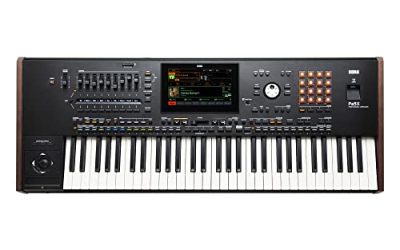
The Korg Pa5X 61 pairs the largest touchscreen in this group with true onboard sampling and an MP3 recorder. Its dual-player design crossfades between songs, and the tilting screen adjusts to the performer position, which helps on stages where the keyboard sits low.
- Keys: 61, semi-weighted with aftertouch
- Polyphony: 160 voices
- Touchscreen: 8-inch tilting capacitive TouchView
- Sampling: 4 GB user PCM onboard, full editing and time-slicing
- Audio recording: MP3 recorder, records styles, MIDI, MP3, keyboard, microphone, and guitar
Best for: solo professionals who want the biggest screen, onboard sampling, and seamless transitions between songs. One point to note: it is the flagship of the Korg arranger range, so it carries the most features to learn before the first gig.
Korg Pa1000 61-Key Professional Arranger

The Korg Pa1000 combines a 7-inch touchscreen with a dual MP3 player and recorder, a vocal harmonizer, and a SongBook for recalling each song setup. It samples onboard and records the full performance, including the microphone, which suits solo singer-players.
- Keys: 61, semi-weighted with aftertouch
- Polyphony: 128 voices
- Touchscreen: 7-inch capacitive TouchView TFT, manual tilt
- Sampling: 300 MB compressed onboard, loads KORG, WAV, AIFF, and SoundFont files
- Audio recording: dual MP3 player and recorder
Best for: solo singer-players who want a touchscreen, recording, and vocal harmony together. One point to note: the sampling memory is smaller than the Pa5X, so a very large custom library needs careful management.
Korg Pa700 61-Key Arranger Workstation

The Korg Pa700 offers the same touchscreen and MP3 recording workflow as the Pa1000 in a lighter instrument. It has a 7-inch TouchView display, onboard sampling, and an MP3 recorder that captures the performance to USB or internal storage.
- Keys: 61, velocity sensitive
- Polyphony: 128 voices
- Touchscreen: 7-inch capacitive TouchView TFT
- Sampling: 128 MB compressed onboard, loads KORG, WAV, AIFF, and SoundFont files
- Audio recording: MP3 recorder to USB and internal storage
Best for: solo performers who want a touchscreen arranger with recording at the most accessible point in the Korg range. One point to note: the sampling memory is the smallest here, so it suits a focused set of custom sounds.
Comparison Table
| Keyboard | Touchscreen | Keys | Polyphony | Audio recording | Onboard sampling |
|---|---|---|---|---|---|
| Yamaha PSR-SX920 | 7-inch colour TFT | 61, FSB | 128 voices | WAV and MP3 to USB | No, expansion only |
| Korg Pa5X 61 | 8-inch tilting TouchView | 61, semi-weighted, aftertouch | 160 voices | MP3, full performance | Yes, 4 GB |
| Korg Pa1000 | 7-inch TouchView | 61, semi-weighted, aftertouch | 128 voices | Dual MP3 player and recorder | Yes, 300 MB |
| Korg Pa700 | 7-inch TouchView | 61, velocity | 128 voices | MP3 recorder | Yes, 128 MB |
Which One Is Right for You?
- Yamaha vocal harmony and chord looping: choose the Yamaha PSR-SX920.
- The largest screen and onboard sampling: choose the Korg Pa5X 61.
- Singing solo sets with a SongBook: choose the Korg Pa1000.
- A first touchscreen arranger for regular gigs: choose the Korg Pa700.
If you sing and play, the Pa1000 and the SX920 both offer vocal harmony, with the Pa1000 adding the SongBook and the SX920 adding the chord looper. If sampling matters, the Korg models sample onboard while the Yamaha loads expansion voices from a computer. If screen size is the priority, the Pa5X leads the group.
Frequently Asked Questions
Is a touchscreen better than buttons on a live arranger?
A touchscreen shows more information and reaches sounds and styles faster, which helps during a set. Buttons are useful for functions used without looking, like starting and stopping a style. Most performers use both: the screen for navigation and the panel controls for starting, stopping, and adjusting volume.
Can I record a whole set on these keyboards?
Yes. The recorders here capture audio to a USB drive, with a limit of around 80 minutes per song on the Yamaha and MP3 recording on the Korg models. For a long set, plan to start a new recording between sets or songs rather than running one file all night.
Do I need a computer to add new sounds?
For expansion voices on the Yamaha, yes — new sounds are prepared in Yamaha Expansion Manager on a computer and loaded in. For the Korg models, sounds can be sampled onboard, and expansion content can also be loaded from USB. A computer is helpful for both, but it is not needed during a performance.
Will the touchscreen work with stage lighting and gloves?
Colour TFT touchscreens are designed to be readable in low light, and brightness can be adjusted. Thin performance gloves may reduce touch response, so most performers use bare hands for screen work and keep a stylus nearby as a backup.
Disclosure: As an Amazon Associate, we may earn from qualifying purchases.
More from Amazon
Programs that pair well with the guide above. Offers and eligibility are set by Amazon and may change.
Free shipping on eligible items, Prime Video and more. Eligible new members can start with a free trial.
Start a Prime free trialAudiobooks and podcasts to listen to on the go. Eligible new members can start with a free trial.
Try Audible freeAd-free music streaming. Eligible new subscribers can start with a free trial.
Try Music Unlimited freeA free business account with business pricing and bulk-buying tools for work, shop or home office.
Create a business accountAs an Amazon Associate we earn from qualifying purchases.
Write Your Review
No reviews yet. Be the first to share your experience!