
Our Short List of 3
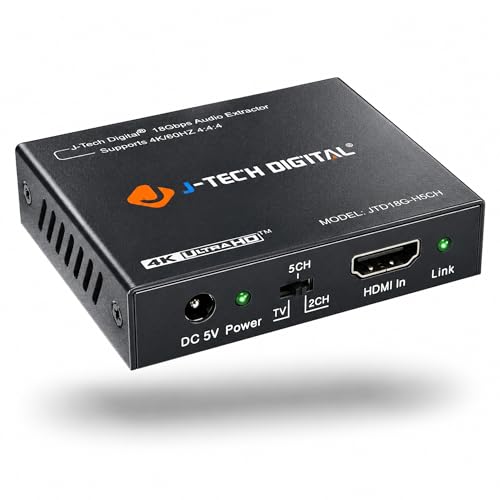
- Best for: 4K HDR consoles and streaming boxes feeding a soundbar or receiver.
- HDMI version: 2.0b, 18Gbps bandwidth
- Compliance: HDCP 2.2
- HDR: HDR10 supported
- Audio outputs: optical SPDIF, 3.5mm stereo
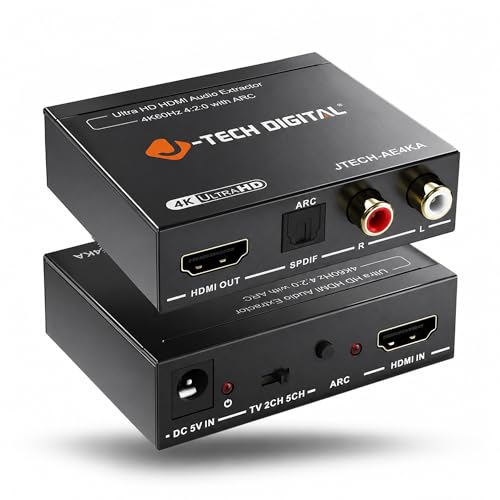
- Best for: Pulling TV audio, including TV apps, out to a soundbar or legacy stereo.
- Resolution support: 4K 60Hz per listing
- ARC: supported
- Audio outputs: optical, RCA stereo
- HDMI version: 1.4

- Best for: Mixed setups pairing a 4K display with both optical and analog audio gear.
- HDMI version: 2.0
- Video: 4K at 60Hz, YUV 4:4:4, HDR supported
- Audio outputs: optical Toslink, L/R RCA
- EDID modes: Pass, 2.0CH, 5.1CH
All 3 Picks at a Glance
| Product | Specs | Action |
|---|---|---|
| 1. J-Tech Digital JTD18G-H5CH |
| Check price on Amazon |
| 2. J-Tech Digital JTECH-AE4KA |
| Check price on Amazon |
| 3. Neoteck HDMI 2.0 Audio Extractor |
| Check price on Amazon |
Key takeaways
- Three HDMI audio extractors compared on 4K and HDR support, optical and analog outputs, ARC handling and EDID modes for TVs, consoles and sound systems.
An HDMI audio extractor sits between a source and your display and pulls the sound out onto its own outputs, so a TV, console, or streaming box can feed a soundbar, AV receiver, or powered speakers that lack the right HDMI input. It is the standard fix for older receivers with no 4K passthrough, TVs without an optical port, and headphone listening from devices that never offer a headphone jack. Every pick below is that specific device type: HDMI in, HDMI out, audio broken out separately.
The differences that matter are bandwidth, output selection, and ARC behavior. One pick handles full HDMI 2.0b signals with HDR, one adds ARC support and RCA outputs for legacy gear, and one covers the common 4K 60Hz middle ground. Match the extractor to your display’s signal first, then to the audio inputs your system actually has.
Quick Picks
As an Amazon Associate we earn from qualifying purchases.
| Product | Best for | Key spec from title |
|---|---|---|
| J-Tech Digital JTD18G-H5CH | 4K HDR sources | HDMI 2.0b, 18Gbps, HDCP 2.2, HDR10 |
| J-Tech Digital JTECH-AE4KA | TVs with ARC | 4K 60Hz with ARC, optical and RCA out |
| Neoteck HDMI 2.0 Audio Extractor | Mixed optical/analog setups | 4K 60Hz HDR, optical and L/R RCA out |
How to Choose
Match the video bandwidth to your display
An extractor passes the video signal through, so its HDMI version caps what your TV can show. HDMI 2.0b at 18Gbps carries 4K at 60Hz with HDR10 and HDCP 2.2, which is what modern consoles and streaming boxes output. HDMI 1.4 extractors still pass 4K at lower refresh rates and are fine for many TVs, but they become the bottleneck in a newer chain. Check your source and display first: if both are 4K HDR capable, choose the extractor that matches them rather than the cheapest box that fits the cable run.
Pick outputs your audio gear can accept
Optical SPDIF carries stereo and compressed 5.1 surround, and it is the most common input on soundbars and older receivers. A 3.5mm or RCA analog output is what headphones, powered speakers, and vintage amplifiers need. Some extractors offer both, which keeps your options open when you change gear. Also note the format limits: analog outputs are stereo only, and certain extractors cannot downmix a 5.1 signal to stereo, so a surround feed can arrive with missing channels on the analog side. The listing usually states this plainly if you read the fine print.
Understand ARC before you rely on it
ARC sends TV audio back down the HDMI cable, and only some extractors support it. If your plan is to extract sound from the TV’s own apps or tuner, ARC support is essential and the extractor’s HDMI output must connect to the TV’s ARC port. If your sources are external boxes plugged into the extractor first, ARC does not matter at all. eARC is a separate, higher-bandwidth feature that none of the common extractor boxes here claim, so lossless disc audio over ARC is outside this category’s scope.
EDID modes decide what the source sends
Extractors expose an EDID switch or dial that tells the source which audio formats to send: passthrough, 2-channel, or 5.1-channel are the usual choices. Set it wrong and you get silence or a stereo downmix you did not want. A unit with clear EDID options is easier to live with because consoles and players negotiate formats automatically and sometimes choose badly. If your receiver handles everything, passthrough is the setting to leave alone; if you feed analog speakers, forcing 2-channel at the extractor prevents missing-dialogue problems. Treat the EDID setting as part of installation, not an afterthought, and revisit it whenever you change a source or a display.
The 3 Best Options
1. J-Tech Digital JTD18G-H5CH
- Best for: 4K HDR consoles and streaming boxes feeding a soundbar or receiver.
- HDMI version: 2.0b, 18Gbps bandwidth
- Compliance: HDCP 2.2
- HDR: HDR10 supported
- Audio outputs: optical SPDIF, 3.5mm stereo
4K HDR consoles and streaming boxes feeding a soundbar or receiver.
No ARC and no 5.1-to-stereo downmix, so TV apps and analog surround playback are weak spots.
This is the full-bandwidth pick: HDMI 2.0b with 18Gbps throughput, HDCP 2.2 compliance, and HDR10 support, so a modern console or streaming box passes its best signal straight through to the TV while the audio breaks out to optical SPDIF or a 3.5mm stereo jack. EDID options cover 2-channel and 5.1-channel modes, which covers most soundbar and receiver pairings. Two honest limits from the listing: it does not support ARC, and it cannot downmix 5.1 to stereo on the analog output. Buy it for an external-source chain, not for extracting TV app audio.
2. J-Tech Digital JTECH-AE4KA
- Best for: Pulling TV audio, including TV apps, out to a soundbar or legacy stereo.
- Resolution support: 4K 60Hz per listing
- ARC: supported
- Audio outputs: optical, RCA stereo
- HDMI version: 1.4
Pulling TV audio, including TV apps, out to a soundbar or legacy stereo.
HDMI 1.4 bandwidth makes it a poor match for newer HDR-focused source chains.
The AE4KA is the ARC pick. It extracts audio from a 4K 60Hz HDMI signal and also supports ARC, so sound from the TV itself can reach external speakers through its optical or RCA outputs. The RCA pair makes it the natural partner for older amplifiers and powered speakers that predate optical inputs. The trade-off sits on the video side: the listing specifies HDMI 1.4 and HDCP 1.4, so it suits TVs and sources that do not push high-bandwidth HDR signals. For a living-room TV with an aging stereo system, that trade is usually the right one.
3. Neoteck HDMI 2.0 Audio Extractor
- Best for: Mixed setups pairing a 4K display with both optical and analog audio gear.
- HDMI version: 2.0
- Video: 4K at 60Hz, YUV 4:4:4, HDR supported
- Audio outputs: optical Toslink, L/R RCA
- EDID modes: Pass, 2.0CH, 5.1CH
Mixed setups pairing a 4K display with both optical and analog audio gear.
ARC is not stated on the listing, so do not plan a TV-app audio path around it.
Neoteck’s extractor covers the middle ground well: HDMI 2.0 with 4K at 60Hz in YUV 4:4:4 and HDR support, plus both an optical Toslink output and an L/R RCA pair, so one box can feed a soundbar today and an analog amplifier tomorrow. Its EDID settings offer Pass, 2.0CH, and 5.1CH modes, and the listing states support for audio sample rates up to 192kHz, which suits music listening through a DAC-style chain. It is a sensible default when your setup mixes modern video with older audio gear and you do not need ARC.
Which One Fits Your Situation
You game on a 4K HDR console
Choose the JTD18G-H5CH. Its 18Gbps HDMI 2.0b passthrough keeps the console’s full 4K HDR signal intact while the optical output feeds your soundbar or receiver. Set the EDID mode to match your audio system, and remember the analog jack will not downmix surround, so optical is the safer output for game audio.
Your receiver predates 4K entirely
Any of the three works, because the extractor splits audio before the receiver ever sees video. The Neoteck is the flexible choice if the receiver has both optical and RCA inputs, while the JTD18G-H5CH is better if you also want the highest-quality video passthrough for a newer TV. Your old receiver keeps doing the job it is good at.
You mainly watch the TV’s built-in apps
Get the JTECH-AE4KA, because ARC support is the deciding feature for TV-generated audio and it is the only pick here that lists it. Connect its HDMI output to the TV’s ARC port and run optical or RCA to your speakers. Accept the HDMI 1.4 ceiling as the price of that convenience.
You listen on headphones or powered speakers
The analog output matters most, so pick between the JTD18G-H5CH’s 3.5mm jack and the RCA outputs on the other two, based on your cable situation. Keep sources set to stereo output where possible, since analog extraction is stereo-only and surround feeds can lose the center channel on boxes without downmixing.
Common Mistakes
- Buying an extractor for TV app audio without checking ARC support, then discovering the box only works with external sources.
- Feeding a 5.1 signal into an analog output and losing dialogue because the extractor does not downmix to stereo.
- Ignoring the HDMI version, so a 1.4 extractor becomes the bottleneck in a 4K HDR chain.
- Leaving the EDID switch on the wrong mode and troubleshooting cables when the source is simply sending an unsupported format.
- Expecting eARC-level lossless audio from this category; standard extractors handle ARC and compressed formats, not lossless disc tracks over ARC.
- Running long, thin HDMI cables on both sides of the extractor, which can cause dropouts that get blamed on the box itself.
Frequently Asked Questions
Where does an audio extractor sit in the chain?
Between the source and the display: source into the extractor’s HDMI input, extractor’s HDMI output to the TV, and a separate optical or analog cable from the extractor to your soundbar, receiver, or speakers. For ARC models, the extractor connects to the TV’s ARC port instead, and the TV becomes the audio source for its own apps and tuner.
Can an extractor send audio to a soundbar and TV speakers at once?
Usually the passthrough keeps video and audio flowing to the TV while the extracted outputs run simultaneously, but behavior varies by model and EDID mode. In practice most people mute the TV speakers and use only the external system, since two unsynchronized sound sources create an echo effect even when both technically work.
Does an extractor reduce video quality?
A correctly matched extractor passes the signal through unchanged, so picture quality stays the same as a direct connection. Problems only appear when the extractor’s bandwidth is lower than the signal, for example feeding a 4K HDR 60Hz signal through an HDMI 1.4 box, which can force the source to fall back to a lower resolution or refresh rate.
Why is there no sound after connecting everything?
The usual cause is the EDID or format negotiation between source, extractor, and audio device. Set the extractor’s EDID mode to match your audio gear, set the source to output a format the extractor lists as supported, and confirm the audio device is on the correct input. Optical cables also need a firm seat at both ends; a loose Toslink plug is a classic silent-failure culprit.
More from Amazon
Programs that pair well with the guide above. Offers and eligibility are set by Amazon and may change.
Free shipping on eligible items, Prime Video and more. Eligible new members can start with a free trial.
Start a Prime free trialAudiobooks and podcasts to listen to on the go. Eligible new members can start with a free trial.
Try Audible freeAd-free music streaming. Eligible new subscribers can start with a free trial.
Try Music Unlimited freeA free business account with business pricing and bulk-buying tools for work, shop or home office.
Create a business accountAs an Amazon Associate we earn from qualifying purchases.


Write Your Review
No reviews yet. Be the first to share your experience!