
Key takeaways
- Five budget studio monitors for music production that fit a small desk and a modest budget, compared on drivers, inputs, and honest near-field sound.
Good mixes start with honest speakers. Regular computer speakers and Bluetooth boxes are tuned to flatter music, boosting bass and smoothing over flaws, which is exactly the wrong thing when you are trying to judge a mix. Studio monitors, by contrast, aim for a flat, uncoloured response, so what you hear is closer to what you actually recorded. The good news is that you do not need a commercial control room or a four-figure budget to get started. The five pairs in this guide are all compact near-field monitors built for desktop music production, and every one of them was selected to sit inside the budget ceiling named in this guide’s keyword. Each one connects directly to a laptop or audio interface, fits on either side of a keyboard, and is a genuine powered monitor pair. Below you will find how they compare, what each one does best, and which one suits your room, your workflow, and your ears.

As an Amazon Associate, we earn from qualifying purchases.
Quick Picks
Our Short List of 3
- Best for: Beginners building a first home studio on a small desk.
- Drivers: 3.5-inch woven composite woofer, 1-inch silk-dome tweeter
- Amplification: 50W Class AB, 25W per side
- Frequency response: 80 Hz to 20 kHz
- Peak SPL: 98 dB at 1 metre
- Best for: Producers who want a warm, relaxed sound and the simplest possible setup.
- Drivers: 4-inch woofer, 13 mm silk-dome tweeter
- Amplification: 42W RMS, 21W per channel
- Frequency response: 75 Hz to 18 kHz
- Signal-to-noise ratio: 85 dBA or better
- Best for: Critical mixing where the flattest response in this guide matters most.
- Drivers: 4-inch woofer, 1-inch silk-dome tweeter
- Amplification: 42W Class D, 21W per channel
- Frequency response: 60 Hz to 20 kHz
- Signal-to-noise ratio: 85 dBA or better
All 3 Picks at a Glance
| Product | Specs | Action |
|---|---|---|
| 1. PreSonus Eris 3.5 Studio Monitors (Gen 2), Pair |
| Check price on Amazon |
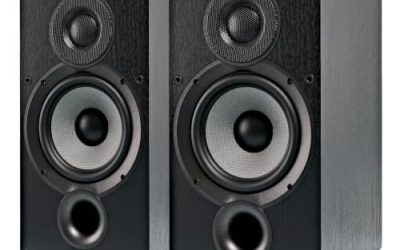
| 3. Edifier R1280T Powered Bookshelf Speakers, Pair |
| Check price on Amazon |
| 5. Edifier MR4 Powered Studio Monitor Speakers, Pair |
| Check price on Amazon |
How We Chose These Speakers
Every speaker in this guide is a powered, active near-field monitor sold as a stereo pair, the format that makes sense for music production on a desk. Passive speakers were left out because they need a separate amplifier, and single speakers were left out because stereo imaging is essential for judging panning and width. We checked that each model is a real, currently listed product on Amazon US, and we only used specifications published by the manufacturer or shown on the product listing.
Woofer size matters more than any other single number at this size. A 3-inch or 3.5-inch driver keeps the cabinet small enough for a crowded desk, but bass rolls off sooner, so very low frequencies will be quieter than they really are in your mix. A 4-inch or 4.5-inch driver reaches lower and gives kick drums and bass lines more body, at the cost of a slightly larger cabinet. None of these pairs replaces a subwoofer for deep sub-bass work, and that is normal for near-field monitors in this class.
Inputs decide how the speakers fit your setup. Balanced TRS inputs resist hum over longer cable runs, which matters if your interface sits across the desk. Unbalanced RCA and aux inputs are fine for short runs from a laptop or phone, but they are more prone to ground-loop hiss near a desktop computer. A front headphone output is a bonus for late-night sessions, and Bluetooth is handy for quick reference checks, though it should never be your only connection for mixing. Remember that “flat” can sound plain at first if you are used to bass-heavy consumer speakers, so give your ears a few sessions to adjust before judging a mix on new monitors.
1. PreSonus Eris 3.5 Studio Monitors (Gen 2), Pair
- Best for: Beginners building a first home studio on a small desk.
- Drivers: 3.5-inch woven composite woofer, 1-inch silk-dome tweeter
- Amplification: 50W Class AB, 25W per side
- Frequency response: 80 Hz to 20 kHz
- Peak SPL: 98 dB at 1 metre
Beginners building a first home studio on a small desk.
The Eris 3.5 is the classic entry point into real studio monitoring, and the second-generation pair keeps everything that made the original a bedroom-studio staple. A 3.5-inch woven composite woofer and a 1-inch silk-dome tweeter are driven by 50 watts of Class AB power, 25 watts per side, with a published frequency response of 80 Hz to 20 kHz and a peak output of 98 dB at one metre. That is enough clean volume for near-field listening at normal desk levels.
Connectivity covers every source a beginner is likely to own. Rear-panel quarter-inch TRS and RCA inputs take a feed from an audio interface or mixer, a front-panel eighth-inch aux input accepts a phone or laptop, and a front headphone output with its own volume control handles quiet sessions. Rear high- and low-frequency acoustic tuning knobs let you trim the response when the speakers sit close to a wall or in a corner, which is where most bedroom desks end up. The pair ships with the speaker cable included, so it works the moment it arrives.
Key specs:
Pros:
Cons:
Why it fits: It is a purpose-built near-field studio monitor pair with balanced inputs, room-tuning controls, and a genuinely compact size, chosen to sit inside this guide’s budget ceiling while giving a beginner an honest reference for learning to mix.
2. Mackie CR3-X Creative Reference Multimedia Monitors, Pair
ASIN: B083N8N7TB
Best for: Creators who want a flexible desk layout with all cables in the box.
The Mackie CR3-X is a 3-inch multimedia monitor pair aimed squarely at desktop creators, and it earns its place here with convenience. A 3-inch polypropylene-coated woofer and a 0.75-inch silk-dome tweeter deliver 50 watts of total power, with a published frequency response reaching down to 45 Hz on the listing. The brushed-metal front panel carries a volume knob and a headphone output, so the controls you reach for most are always in front of you rather than hidden around the back.
The standout feature is layout flexibility. A switch lets you choose which speaker carries the powered side, so the volume and headphone controls can sit on the left or the right to suit your desk. TRS, RCA, and 3.5 mm inputs cover interfaces, computers, and phones, and Mackie includes the speaker cable plus TRS and RCA cables in the box, which is rare at this level and saves a separate cable order. The pair carries a one-year warranty.
Key specs:
- Drivers: 3-inch polypropylene-coated woofer, 0.75-inch silk-dome tweeter
- Amplification: 50W total
- Frequency response: 45 Hz on the product listing
- Inputs: TRS, RCA, 3.5 mm, front headphone output
- Layout: powered-side selector switch for left or right placement
- Included: speaker cable, TRS cable, and RCA cable
- Warranty: 1 year
Pros:
- All cables included, so there is nothing extra to buy before setup
- Powered-side switch adapts to left- or right-handed desk layouts
- Front-panel volume and headphone jack keep daily controls in easy reach
Cons:
- Unbalanced RCA connections can pick up ground-loop hiss near a desktop PC
- Midrange is slightly recessed compared with flatter rivals, so vocal balances need a second check
Why it fits: It is a compact powered monitor pair with studio-style inputs, a sensible size for near-field listening, and a complete in-box cable kit, all inside this guide’s budget ceiling, making it a low-friction first pair for music production.
3. Edifier R1280T Powered Bookshelf Speakers, Pair
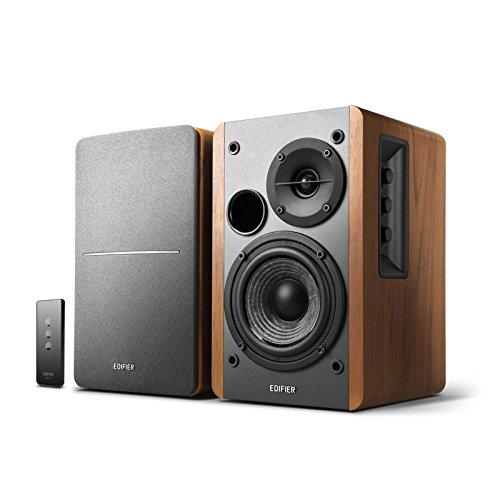
- Best for: Producers who want a warm, relaxed sound and the simplest possible setup.
- Drivers: 4-inch woofer, 13 mm silk-dome tweeter
- Amplification: 42W RMS, 21W per channel
- Frequency response: 75 Hz to 18 kHz
- Signal-to-noise ratio: 85 dBA or better
Producers who want a warm, relaxed sound and the simplest possible setup.
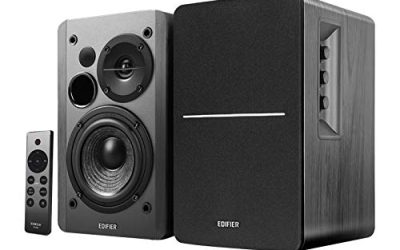
The Edifier R1280T has been a fixture of budget desktop audio for years, and it remains a sensible pick for music production when the priority is a pleasant, non-fatiguing listen during long sessions. A 4-inch woofer and a 13 mm silk-dome tweeter deliver 42 watts RMS, 21 watts per channel, with a published frequency response of 75 Hz to 18 kHz and a signal-to-noise ratio of 85 dBA or better. The wooden MDF enclosure gives the pair a retro look and helps damp cabinet resonance.
Setup could hardly be simpler. Two RCA inputs let a computer and a turntable, or an interface and a phone, stay connected at the same time, and a small remote control handles volume from across the room. Bass and treble tone controls on the side of the active speaker adjust the response from minus 6 to plus 6 dB. There are no balanced inputs and no Bluetooth, which keeps the design focused.
Key specs:
Pros:
Cons:
Why it fits: It is a powered near-field pair with a real 4-inch driver, honest published specifications, and a straightforward two-input design, selected within this guide’s budget ceiling for producers who value an easy, warm-sounding desktop setup.
4. JBL Professional 1 Series 104-BT Compact Desktop Reference Monitors, Pair
ASIN: B07ZR2G296
Best for: Small rooms where accurate imaging and wireless reference checks matter most.
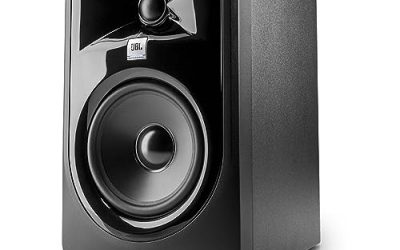
The JBL 104-BT is the most technically distinctive pair in this guide, built around a coaxial driver that places the tweeter inside the woofer. The 4.5-inch coaxial driver pairs a contoured low-frequency woofer with a 0.75-inch soft-dome tweeter, driven by a 60-watt Class D amplifier, 30 watts per channel, with a published frequency response of 60 Hz to 20 kHz and a maximum output of 104 dB SPL. The coaxial layout widens the sweet spot and keeps the stereo image stable when you move your head, which is genuinely useful in a small room.
Connectivity is the most complete here. Dual quarter-inch balanced TRS, dual RCA, and a single eighth-inch aux input cover wired sources, and Bluetooth 5.0 adds wireless streaming for quick reference checks against commercial mixes. A front-panel input control selects Bluetooth, aux, RCA, TRS, or a combination of inputs, so switching between a mix and a phone call takes one turn of a knob. The compact, curved cabinets take up very little desk space.
Key specs:
- Drivers: 4.5-inch coaxial woofer, 0.75-inch soft-dome tweeter
- Amplification: 60W Class D, 30W per channel
- Frequency response: 60 Hz to 20 kHz
- Maximum SPL: 104 dB
- Inputs: dual TRS, dual RCA, 3.5 mm aux, Bluetooth 5.0
- Control: front-panel input selector
- Sold as: stereo pair
Pros:
- Coaxial driver design gives a wide, stable sweet spot for near-field mixing
- Bluetooth 5.0 makes wireless reference checks against finished tracks easy
- Strongest amplifier and lowest published bass reach in this guide
Cons:
- Bluetooth is a convenience for referencing, not a connection to mix over
- Compact cabinets still need careful placement, as bass builds up near walls
Why it fits: It is a purpose-built desktop reference monitor pair with a coaxial driver, balanced inputs, and the deepest bass reach of the five, chosen within this guide’s budget ceiling for producers working in tight rooms who want imaging they can trust.
5. Edifier MR4 Powered Studio Monitor Speakers, Pair
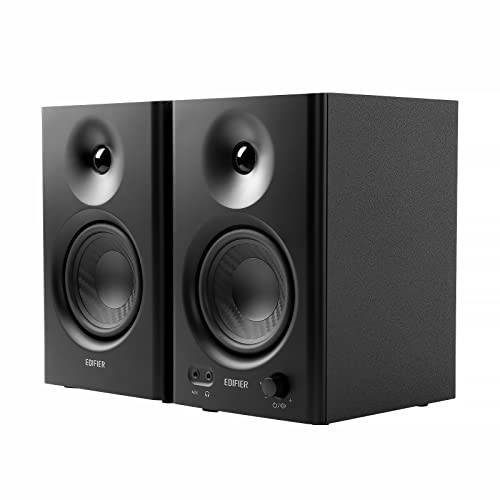
- Best for: Critical mixing where the flattest response in this guide matters most.
- Drivers: 4-inch woofer, 1-inch silk-dome tweeter
- Amplification: 42W Class D, 21W per channel
- Frequency response: 60 Hz to 20 kHz
- Signal-to-noise ratio: 85 dBA or better
Critical mixing where the flattest response in this guide matters most.
The Edifier MR4 is the most deliberately studio-focused pair here, tuned toward a near-flat response curve rather than a flattering one. A 4-inch low-frequency diaphragm woofer and a 1-inch silk-dome tweeter are driven by 42 watts of Class D power, 21 watts per channel, with a published frequency response of 60 Hz to 20 kHz, a signal-to-noise ratio of 85 dBA or better, and distortion of 0.2 percent or less. MDF wooden cabinets help keep resonance down, and a digital signal processor works with the amplifier.
The headline feature is a dual-mode switch. Monitor mode gives the flat response you want for mixing decisions, while music mode adds a more relaxed voicing for everyday listening, so one pair covers both jobs without re-EQing your system. Inputs include quarter-inch balanced TRS for an interface or mixer, unbalanced RCA, and a 3.5 mm aux input, plus a front headphone output. Separate high- and low-frequency knobs on the front panel make quick tonal adjustments easy.
Key specs:
Pros:
Cons:
Why it fits: It is a true near-field studio monitor pair with a flat monitor mode, balanced inputs, and a 4-inch driver, selected within this guide’s budget ceiling as the strongest choice in this guide for producers who mix first and listen for pleasure second.
Frequently Asked Questions
Do I need a subwoofer with these speakers?
For most beginners, no. Near-field monitors in this class cover kick drums and bass guitars well enough to learn on. A subwoofer becomes useful later if you produce bass-heavy genres and need to judge frequencies below about 60 Hz, where even the larger pairs here begin to roll off. Until then, cross-checking the low end on headphones is a practical habit.
Can I connect these speakers directly to my laptop?
Yes. Every pair in this guide has an unbalanced input, RCA or 3.5 mm aux, that accepts a laptop headphone output directly. For cleaner sound and lower noise, an inexpensive USB audio interface with balanced TRS outputs is the usual next step, and the PreSonus, Mackie, JBL, and Edifier MR4 pairs all accept that connection.
Are budget studio monitors good enough for mixing?
They are good enough to learn on and to finish mixes that translate reasonably well, provided you understand their limits. Their main weakness is deep bass, not midrange or treble accuracy, and that is where most mix decisions about vocals, guitars, and drums actually happen. Reference your mixes on headphones, car speakers, and earbuds as well, and no single pair of budget monitors has to carry the whole job alone.
What is the difference between studio monitors and regular speakers?
Studio monitors aim for a flat frequency response, reproducing the signal without adding bass boost or treble sparkle, so mix problems stay audible. Regular consumer speakers are tuned to sound pleasing, which is fine for listening but misleading for production decisions. Monitors are also usually sold as matched pairs designed for near-field listening at a desk.
Do I need acoustic treatment for these speakers to work?
You do not need a treated room to start. Keep the tweeters near ear height, angle the pair slightly toward you, and avoid pushing the cabinets hard against a wall. Soft furnishings, a rug, and bookshelves already help more than most beginners expect, and proper treatment can come later.
Conclusion
There is no single right pair here, only the right pair for your desk and your workflow. The PreSonus Eris 3.5 is the easiest first monitor for a beginner, the Mackie CR3-X is the most convenient to set up, the Edifier R1280T is the warmest and simplest listener, the JBL 104-BT brings the best imaging and wireless referencing, and the Edifier MR4 gives the flattest response for serious mixing. All five are real powered monitor pairs inside this guide’s budget ceiling, and any of them is a large step up from mixing on laptop speakers. Pick the one that matches how you work, set it up carefully, and let your ears adjust before you judge it.
Verified: Nov 27, 2026 — ASINs checked on Amazon.
More from Amazon
Programs that pair well with the guide above. Offers and eligibility are set by Amazon and may change.
Free shipping on eligible items, Prime Video and more. Eligible new members can start with a free trial.
Start a Prime free trialAudiobooks and podcasts to listen to on the go. Eligible new members can start with a free trial.
Try Audible freeAd-free music streaming. Eligible new subscribers can start with a free trial.
Try Music Unlimited freeA free business account with business pricing and bulk-buying tools for work, shop or home office.
Create a business accountAs an Amazon Associate we earn from qualifying purchases.
Write Your Review
No reviews yet. Be the first to share your experience!