

Key takeaways
- Best for: regular television viewing, older TVs, simple controls, and people who do not want to manage Bluetooth pairing.
- Strengths: consistent connection, physical volume buttons, charging dock, and usually very little audio delay.
- Limitations: less useful for commuting or phone calls; some models are bulky and use proprietary batteries or charging parts.
The best TV headphones for most people are dedicated wireless RF or low-latency Bluetooth headphones with a transmitter, because they provide clearer dialogue, fewer lip-sync problems, and more dependable volume control than ordinary Bluetooth headphones.
Our top picks


As an Amazon Associate we earn from qualifying purchases at no extra cost to you. Ratings are shown as listed on Amazon.
Quick picks by listening situation
| Situation | Best type or pick | Why it fits | Typical market range |
|---|---|---|---|
| Older TV or frequent use | Sennheiser RS 175 | Dedicated RF transmitter, long indoor range, simple base-station charging | $200–$300 |
| Dialogue is difficult to follow | Sennheiser RS 195 | Speech-focused listening modes and independent left/right volume adjustment | $300–$400 |
| One purchase for TV, phone, and tablet | Bluetooth headphones with a low-latency transmitter | More versatile than dedicated TV sets; choose a transmitter supporting aptX Low Latency or aptX Adaptive | $100–$350 |
| Low-cost wireless setup | Avantree HT4186 or a similar transmitter-and-headphone kit | Usually includes the cables needed for optical or 3.5 mm TV connections | $60–$120 |
| Two viewers need private audio | Dual-headphone Bluetooth transmitter system | Can send sound to two compatible headphones, although delay matching can be imperfect | $80–$200 |
RF versus Bluetooth: the connection decision
RF headphones use a dedicated transmitter connected to the television. The transmitter usually plugs into optical digital audio, 3.5 mm headphone output, or RCA audio output. The headphones then receive a private signal without competing with nearby Bluetooth devices. This is often the most reliable choice for watching television from another room or moving around a large living room.
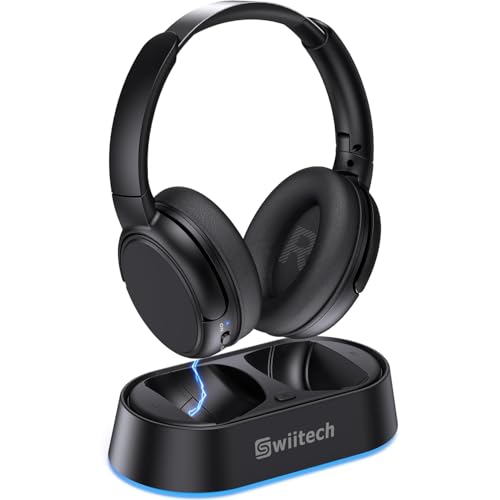
Sennheiser’s RS 175 and RS 195 are examples of dedicated RF systems. Their charging transmitters also act as storage docks, making them convenient for nightly use. A typical indoor range is roughly 100 metres under favourable conditions, but walls, metal appliances, and building construction can reduce usable range substantially. Treat the advertised distance as an open-area maximum rather than a guaranteed coverage figure.
Bluetooth headphones are more flexible. They can work with a television that has Bluetooth audio output and can also connect to a phone or computer. The drawback is that TV Bluetooth implementations vary. Some televisions support only basic codecs, while others introduce noticeable delay. A separate Bluetooth transmitter connected to the TV gives you more control over compatibility and latency.
For lip-sync, look for a stated delay of about 40 milliseconds or less. aptX Low Latency can achieve this when both the transmitter and headphones support it. aptX Adaptive can also offer low delay, but actual performance depends on the devices and settings. Standard SBC Bluetooth may be perfectly acceptable on one television and distracting on another.
Head-to-head: dedicated TV headphones or ordinary wireless headphones?
Dedicated TV headphones
- Best for: regular television viewing, older TVs, simple controls, and people who do not want to manage Bluetooth pairing.
- Strengths: consistent connection, physical volume buttons, charging dock, and usually very little audio delay.
- Limitations: less useful for commuting or phone calls; some models are bulky and use proprietary batteries or charging parts.
Bluetooth headphones with a transmitter
- Best for: people who want one headset for TV, music, travel, and mobile devices.
- Strengths: broad device compatibility, replaceable listening modes on some models, and often better portability.
- Limitations: pairing can be confusing, codec support must match, and headphones may disconnect when switching between devices.
Noise-cancelling headphones can be comfortable for TV, but active noise cancellation is not the same as dialogue enhancement. It reduces external noise; it does not automatically make quiet consonants or voices clearer. If speech intelligibility is the priority, a dedicated speech mode, adjustable tone controls, or a three-band equalizer is more valuable.
What matters most for clear dialogue
Look for a sound profile that keeps the midrange—roughly the area where much speech information sits—clean and prominent. Excessive bass can mask dialogue, especially in films with music and effects. A “speech,” “voice,” or “dialogue” mode can help, but compare it with the normal mode because aggressive processing may make voices sound thin.
Independent left and right volume controls are useful when one ear hears differently from the other. The Sennheiser RS 195 is notable for offering speech-focused profiles and separate balance adjustment. This is a listening convenience, not a treatment for hearing loss. If conversations remain difficult to understand even at comfortable volume, an audiologist can provide appropriate advice.
Also check whether the TV speakers remain active when headphones are connected. Optical output often leaves the television speakers under separate control, while a 3.5 mm headphone connection may mute them. For shared viewing, choose a TV or transmitter that explicitly supports simultaneous headphone and speaker output.
Volume controls and accessibility details
- Large physical buttons: easier to identify without looking away from the screen than touch controls.
- Independent balance: helpful when the left and right ears need different levels.
- Wide volume range: the lowest setting should be quiet enough for late-night use, while the maximum should not be the only way to hear dialogue.
- Automatic shutoff: saves battery when the headphones are removed, but confirm that it does not interrupt long programs.
- Comfort-adjustable headband: important for two- or three-hour films; excessive clamping pressure becomes more noticeable over time.
- Eyeglass compatibility: soft, deep ear cushions usually work better than shallow pads that press against spectacle arms.
Connection setup: avoid the common delay and volume problems
- Identify the TV output. Optical, 3.5 mm, and RCA are the most common options. HDMI ARC is less convenient unless the transmitter specifically supports it.
- Choose the correct TV audio setting. Set digital audio output to PCM or stereo PCM when a transmitter cannot decode Dolby or DTS. An incompatible bitstream setting can produce silence.
- Connect the transmitter before pairing. Use optical where available for a consistent digital signal, or 3.5 mm if you need the television’s headphone-volume controls.
- Pair only the intended device. Turn off nearby Bluetooth headphones during initial pairing to prevent the transmitter from selecting the wrong headset.
- Check lip-sync with spoken content. Use a news program or close-up conversation, not a music video. If voices lag behind mouths, try a low-latency mode or RF system.
- Set a comfortable baseline volume. Avoid repeatedly compensating for muffled dialogue by turning the entire system louder; adjust speech mode, tone, or balance first.
Battery life, range, and ownership realities
| Feature | Practical target | Why it matters |
|---|---|---|
| Battery runtime | 18–30 hours for Bluetooth; about 15–25 hours for many dedicated TV models | Covers several evenings without daily charging |
| Charging time | 2–4 hours | Determines whether a short recharge can save an evening |
| Indoor wireless range | 10–30 metres for dependable room-to-room use | More realistic than the maximum open-area specification |
| Headphone weight | 250–350 grams for many over-ear wireless designs | Lower weight can reduce fatigue, but cushion design matters as much as the number |
| Warranty and battery service | At least one year; longer is preferable | Rechargeable batteries are commonly the first electronic component to age |
A simple runtime calculation illustrates why battery capacity matters: if a headset provides 20 hours and you watch two hours each night, the theoretical interval is 10 nights. In practice, allow 15–25% for standby drain, ageing, and higher volume, so expect roughly eight nights rather than ten.
The ear cushions usually wear before the wireless electronics. Sweat, skin oils, and repeated compression flatten foam and can make dialogue seem less isolated. Wipe cushions with a lightly damp cloth, let them dry completely, and check whether replacement pads are available. Do not soak pads or spray cleaner into the ear cups. Keep the transmitter unobstructed and return the headset to its dock or charger after use.
Final buying advice
Choose the Sennheiser RS 175 when reliable RF performance and straightforward TV use matter most. Choose the RS 195 when dialogue shaping, balance controls, and accessibility-oriented adjustments justify the higher price. Choose a Bluetooth headphone and low-latency transmitter when you want one device for television and mobile listening. For a tighter budget, an Avantree-style transmitter kit can be practical, but verify the television’s output, codec compatibility, and return policy before buying.
The most important specification is not maximum wireless distance. It is the combination of low delay, clear midrange speech, usable independent volume controls, comfortable fit, and a connection method that matches your TV. Those factors determine whether private listening remains convenient after the first week.





Write Your Review
No reviews yet. Be the first to share your experience!