

Key takeaways
- PC: USB-C dongles usually work directly, and USB-A adapters may be included. Check whether the companion app supports your operating system.
- PlayStation 5: USB audio dongles are generally the safest wireless route. Console chat and sidetone support can vary by model.
- Xbox: Many ordinary USB wireless dongles are not supported. Look specifically for an Xbox-compatible version or use the controller’s 3.5 mm port.
- Nintendo Switch: USB-C wireless can work in handheld mode, while docked use may require a USB-A adapter. Bluetooth is convenient but may have more delay.
- Phones and tablets: Bluetooth is simplest. A dongle may require an adapter and can obstruct a charging port.
The best gaming earbuds for most players are low-latency 2.4GHz wireless earbuds with a USB-C dongle, but wired in-ear monitors remain the smarter choice for the lowest cost and guaranteed compatibility.
Our top picks


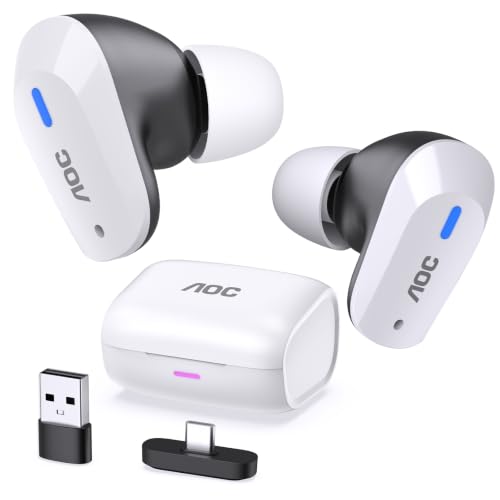
As an Amazon Associate we earn from qualifying purchases at no extra cost to you. Ratings are shown as listed on Amazon.
Quick picks by gaming situation
| Situation | Best fit | Why | Typical price range |
|---|---|---|---|
| Competitive PC or PlayStation gaming | Sony INZONE Buds | USB-C 2.4GHz connection, very low latency, long battery life | $150–$200 |
| PC, PlayStation, Xbox, and mobile households | Razer Hammerhead HyperSpeed family | Platform-specific dongle versions and Bluetooth support | $100–$150 |
| Console-focused players wanting a newer all-rounder | SteelSeries Arctis GameBuds | 2.4GHz wireless, Bluetooth, active noise cancellation, broad console support | $150–$170 |
| Lowest cost and no wireless troubleshooting | Wired gaming IEMs, such as the Final VR3000 | Instant connection, no battery, strong positional imaging | $70–$100 |
| Travel and casual gaming | Bluetooth gaming earbuds with a gaming mode | Small charging case and everyday convenience | $50–$150 |
Prices are general market ranges and vary by region, sales, and platform-specific bundles. Before buying, confirm whether the package is designed for PlayStation, Xbox, PC, Switch, or mobile; a USB-C dongle that works on one console may not work on another.
What separates gaming earbuds from ordinary wireless earbuds?
Bluetooth audio can introduce a noticeable delay between an in-game event and the sound reaching your ears. That is acceptable for podcasts and many single-player games, but it can affect rhythm games, shooters, and competitive play. The strongest gaming earbuds use a dedicated 2.4GHz wireless link through a USB dongle. With a compatible system, this usually delivers latency in the approximate 20–40 millisecond range, compared with latency that can commonly rise beyond 100 milliseconds over standard Bluetooth.
Bluetooth is still useful for phones and tablets, but “gaming mode” does not always make it equivalent to 2.4GHz. It reduces delay at the cost of wireless range, connection flexibility, or audio quality. Look for earbuds that let you switch between Bluetooth and a dedicated dongle rather than relying on Bluetooth alone.
Head-to-head: the leading wireless approaches
Sony INZONE Buds: battery endurance and competitive latency
The INZONE Buds use a USB-C 2.4GHz transceiver and are rated for up to 12 hours of continuous use from the earbuds, with the charging case extending total use to approximately 24 hours. Their advertised weight is about 6.5 grams per earbud, making them relatively light. The connection is intended for PC and PlayStation 5, while Bluetooth support is handled through a low-power Bluetooth mode rather than being the main competitive-gaming link.
They are a strong choice for players who value long sessions, low delay, and a lightweight fit. The limitation is platform flexibility: Xbox users and people who regularly move between many devices should check compatibility carefully before choosing them.
Razer Hammerhead HyperSpeed: useful platform variants
The Hammerhead HyperSpeed line combines a 2.4GHz USB dongle with Bluetooth and typically offers around 4–6 hours of earbud playback, depending on settings, with roughly 16–30 hours including the case. Razer sells versions aimed at different console ecosystems, so the model name and included dongle matter. Some versions support PlayStation and PC, while others are marketed for Xbox and PC.
These earbuds are appealing when one household includes several platforms, but their microphones and battery endurance are not always as compelling as their connectivity. Treat the quoted battery number as a best-case figure: microphone use, higher volume, lighting, and active noise cancellation can reduce it.
SteelSeries Arctis GameBuds: a feature-rich console option
Arctis GameBuds combine 2.4GHz wireless and Bluetooth, and selected versions include active noise cancellation. The advertised battery target is approximately 10 hours for the earbuds and up to 40 hours with the charging case, though actual runtime depends on ANC, volume, and connection mode. The earbuds weigh roughly 7 grams each.
Their strongest argument is convenience: one pair can cover console gaming, PC use, and everyday Bluetooth listening. ANC is useful on a train or in a noisy room, but it is not essential for positional audio. Competitive players should compare the fit and microphone performance with the game they play most rather than buying ANC as a substitute for low latency.
Why wired earbuds still make sense
A wired in-ear monitor avoids wireless delay, pairing failures, battery wear, and dongle compatibility problems. The Final VR3000 is designed for gaming and virtual-reality sound, weighs about 7 grams per side, and uses a detachable-style? No: its supplied cable is fixed, so replacement is less convenient than with detachable-cable IEMs. That distinction matters for long-term ownership.
Wired earbuds also offer a useful price advantage. A $90 wired model used for 300 gaming sessions costs about $0.30 per session before any replacement, whereas a $160 wireless model used for 500 sessions costs about $0.32 per session—but only if its battery remains healthy and the charging case survives. Wired models are less convenient on a sofa and may need a USB audio adapter or controller connection, but they are excellent at a desk.
Positional sound and microphone clarity
Good positional audio is not the same as exaggerated bass. Explosive low frequencies can mask quiet footsteps and reload sounds. For shooters, look for controlled bass, clear upper-midrange detail, and left-to-right imaging that remains stable when you turn your character. A wide, airy presentation can help with distant cues, but imaging accuracy matters more than an artificially “3D” sound mode.
Microphone quality is a separate decision. Small earbuds have less room for a boom microphone, so built-in microphones can sound thinner or more affected by keyboard and room noise than a headset microphone. Beamforming and noise suppression help, but software can also clip syllables or make voices sound processed. If team communication is central to your play, choose a model with a documented microphone-monitoring feature and test voice-chat levels before an important match.
Platform compatibility checklist
- PC: USB-C dongles usually work directly, and USB-A adapters may be included. Check whether the companion app supports your operating system.
- PlayStation 5: USB audio dongles are generally the safest wireless route. Console chat and sidetone support can vary by model.
- Xbox: Many ordinary USB wireless dongles are not supported. Look specifically for an Xbox-compatible version or use the controller’s 3.5 mm port.
- Nintendo Switch: USB-C wireless can work in handheld mode, while docked use may require a USB-A adapter. Bluetooth is convenient but may have more delay.
- Phones and tablets: Bluetooth is simplest. A dongle may require an adapter and can obstruct a charging port.
Comfort, fit, and battery: the overlooked buying criteria
Earbud comfort depends more on nozzle shape, ear-tip size, and housing shape than on weight alone. A 6-gram earbud can feel uncomfortable if its nozzle presses against the ear canal, while a slightly heavier model can disappear when its shape distributes pressure well. Try the smallest secure ear tip first, then increase size only if the seal breaks during movement.
A practical runtime calculation helps avoid disappointment. If your gaming sessions last three hours and a pair provides six hours per charge, it covers two sessions, not three, because manufacturers quote playback under controlled conditions. With ANC and microphone use reducing runtime by 20 percent, six hours becomes approximately 4.8 hours—only 1.6 three-hour sessions. Players who regularly game for four hours should target at least eight hours of advertised earbud battery life or choose a model that can charge while stored in its case between sessions.
Durability and ownership realities
- Ear tips wear first: Silicone tips stretch, tear, and collect skin oil. Replace them when the seal becomes inconsistent; inexpensive third-party tips may change the sound and fit.
- Charging contacts need cleaning: Sweat and dust can stop an earbud from charging. Wipe the contacts with a dry, lint-free cloth and keep moisture out of the case.
- Rechargeable batteries age: Wireless earbuds cannot usually provide the original runtime forever. Heat, constant full-charge storage, and deep discharge accelerate decline.
- Do not block microphones: Earwax, clothing, and a poorly fitted tip can make voice chat sound muffled or trigger aggressive noise suppression.
- Protect the dongle: Repeatedly bending a USB-C adapter or leaving it plugged into a laptop bag can damage the connector. Store it in the case when possible.
Final buying advice
Choose the Sony INZONE Buds if you mainly play on compatible PC or PlayStation systems and prioritize battery life and low latency. Choose a Razer Hammerhead HyperSpeed version when platform-specific compatibility and Bluetooth flexibility matter more. Choose SteelSeries Arctis GameBuds when you want a broad feature set and long case endurance. Choose wired gaming IEMs when your setup is desk-based, your budget is limited, or you want to remove battery and wireless variables entirely.
The best gaming earbuds are therefore not defined by the loudest bass or the longest feature list. Match the connection to your platform, the microphone to your communication needs, the fit to your ears, and the battery rating to your real session length. That approach produces a better result than choosing solely by brand or advertised surround-sound mode.





Write Your Review
No reviews yet. Be the first to share your experience!