
Key takeaways
- Find the best microphones for recording videos, from shotgun and USB mics to wireless lavalier systems, with clear, practical guidance on sound, setup, and fit.
The best microphones for recording videos are the ones that match how you record, where you record, and what your camera or computer can connect to. A microphone that sounds warm and full in a quiet room can sound thin and distant outdoors, while a microphone built for a camera hot shoe may be the wrong choice for a desk setup where you sit close to a computer. The goal is not to buy the most complex microphone you can find. The goal is to buy the microphone that puts your voice clearly in front of the picture, without hiss, echo, handling noise, or constant fiddling with settings.
If you want a quick answer, start with the type first and the model second. For a camera that moves with you, a shotgun microphone or a wireless lavalier system usually makes the most sense. For a fixed desk, a studio, or a voiceover corner, a USB microphone or a USB and XLR microphone usually makes the most sense. The microphone should sit close to the sound source, point at the voice you want, and reject as much room sound and wind as it can. That simple rule explains most of the difference between a video that sounds polished and a video that sounds distant.
This guide covers the full range, not one narrow type. You will find shotgun microphones that mount on a camera, a compact shotgun microphone for travel, a USB microphone for desk recording, a wireless lavalier system for moving presenters, and a hybrid microphone that can work with a computer now and with a more advanced audio setup later. Each pick below is a microphone built for recording videos, and each one suits a different kind of creator.
Quick Picks
| Product | Best For | Key Spec |
|---|---|---|
| Rode VideoMic Pro+ | Camera-mounted shotgun recording | Supercardioid shotgun, hot shoe mount, 3.5 mm output |
| Rode VideoMicro | Compact travel and vlogging | Compact cardioid shotgun, hot shoe mount, 3.5 mm output |
| Logitech Blue Yeti | Desk recording and voiceover | USB condenser, four pickup patterns, headphone monitoring |
| DJI Mic 2 | Wireless recording while moving | Two transmitters, wireless receiver, clip-on design |
| Shure MV7 | Voiceover with room to grow | USB and XLR outputs, dynamic capsule, headphone monitoring |
How to Choose
Match the Microphone Type to the Shot
Start by picturing your usual shot. If the camera is on a tripod and you sit or stand in one place, a desk microphone or a microphone on a boom arm can sit close to your mouth and stay out of frame. If you walk, turn, cook, play, or present while you move, a lavalier microphone or a wireless system keeps the microphone close to you even when the camera is farther away. If you film outdoors, on location, or in a large room, a shotgun microphone helps focus on the voice in front of the camera and reduce sound from the sides.
Check the Connection Before You Buy
A microphone is only useful if it connects to the device that records your video. Camera-mounted shotgun microphones usually use a 3.5 mm cable into the camera microphone input. USB microphones connect to a computer, a tablet, or a phone with a suitable adapter, and they are a natural fit for screen recording, voiceover, and videos recorded straight into editing software. Wireless systems use a receiver that plugs into a camera or a phone, with transmitters that clip to clothing or sit in a pocket.
Listen for Direction, Not Just Volume
Microphone makers describe direction with terms such as cardioid, supercardioid, and omnidirectional. A cardioid microphone picks up sound mainly from the front and rejects much of the sound from behind. A supercardioid shotgun microphone narrows that focus further, which helps outdoors and in noisy rooms, but it also means you must aim it carefully at the voice. An omnidirectional lavalier microphone picks up sound from all directions, which makes placement forgiving, but it also picks up more room sound.
Plan for Wind, Handling Noise, and Room Echo
Good video audio is often decided by accessories and placement, not by the microphone alone. Wind is the most common problem outdoors. A foam windscreen helps with light wind, while a furry wind cover helps in stronger wind. Handling noise comes from touching the microphone, the cable, or the mount while you record, so a shock mount, a stable tripod, and a cable that does not tug on the microphone all help. Room echo comes from hard floors, bare walls, and high ceilings, so a rug, curtains, bookshelves, and soft furniture can improve a recording more than a new microphone in the same bare room.
Think About Power and Recording Time
Different microphones get power in different ways. USB microphones draw power from the computer or device they connect to. Many shotgun microphones use a small battery or draw plug-in power from the camera. Wireless systems use rechargeable batteries in the transmitters and the receiver, and they need charging between sessions. XLR microphones may need phantom power from an interface or a recorder. None of these is a problem on its own, but each one adds a step to your routine.
Consider Size, Weight, and How You Will Carry It
A microphone that stays on a desk can be large and heavy, and that weight can even help it stay stable. A microphone that mounts on a camera must be light enough not to unbalance the camera, small enough not to appear in a wide shot, and tough enough to survive travel. A wireless transmitter must be small enough to clip to clothing without pulling it down or showing in frame. Size and weight are not minor details for video work, because the microphone is part of the picture as well as part of the sound.
The Best Microphones for Recording Videos Reviewed
The models below cover the main ways creators record video sound. One listing in this guide carries a verified Amazon link, shown with its ASIN. The other models are named so you can search for the current listing that matches your camera, phone, and computer, and confirm the listing details before you buy.
Rode VideoMic Pro+
The Rode VideoMic Pro+ is a camera-mounted shotgun microphone for creators who want focused, directional sound straight into a camera. Its supercardioid pattern helps it pick up the voice in front of the lens while reducing sound from the sides, which is useful for interviews, vlogs, documentaries, and outdoor filming. It mounts on a camera hot shoe, connects with a 3.5 mm cable, and includes controls for gain, a high-pass filter, and a safety channel that can help protect a recording from sudden loud sounds.
This microphone suits a creator who films with a camera that has a microphone input and who wants a clear step up from a built-in camera microphone without carrying a separate recorder. It suits interviews at a fixed distance, presenters talking to camera, and location work where the subject stays in front of the lens. It is a strong choice when you want the microphone to follow the camera, rather than the presenter.
Skip this microphone if your camera has no microphone input, if you need to record a presenter who walks away from the camera, or if you record mainly at a desk with a computer. A wireless lavalier system will follow a moving presenter better, and a USB microphone will be simpler and closer for desk work.
Rode VideoMicro
The Rode VideoMicro is a compact shotgun microphone for travel, vlogging, and light camera kits. It is smaller and lighter than a full-size shotgun microphone, mounts on a camera hot shoe, and connects with a 3.5 mm cable. Its cardioid pattern gives it a wider pickup area than a supercardioid shotgun microphone, which makes aiming more forgiving when you are filming yourself, walking, or working quickly. It draws power from the camera, so there is no battery to charge or replace, and it comes with a furry wind cover for outdoor use and a mount that helps reduce handling noise.
This microphone suits a creator who wants better sound than a built-in camera microphone without adding much weight or bulk. It suits travel vlogs, family videos, short social clips, and handheld filming where the setup must stay simple.
Skip this microphone if you need a narrow, highly directional pickup for a noisy location, if you need a microphone for a presenter who moves away from the camera, or if you record mainly at a desk.
Logitech Blue Yeti (B002VA464S)
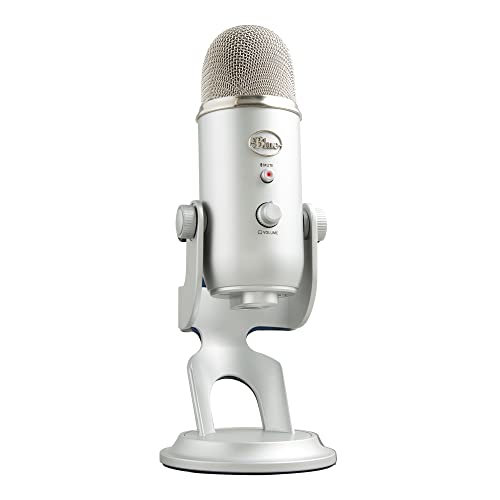
The Logitech Blue Yeti is a USB condenser microphone for desk recording, voiceover, and videos recorded into a computer. It uses a three-capsule array and four pickup patterns: cardioid for a single voice, bidirectional for two people facing each other, omnidirectional for a room or a group, and stereo for music or a wider sound field. It has a gain control, a mute button, and a headphone output for monitoring, and it connects by USB with no separate audio interface.
This microphone suits a creator who records voiceover, tutorials, talking-head videos, podcasts, and screen recordings at a desk. It suits a single voice in a quiet room, a two-person interview across a desk, and a creator who wants one microphone that can handle several recording styles. The four patterns are a real advantage when your videos change from solo narration one day to a conversation the next.
Skip this microphone if you film mainly outdoors, if you move while you present, or if you need a microphone that mounts on a camera. It is a desk microphone by design, and it will pick up room sound, keyboard noise, and fan noise if it sits too far from your mouth.
DJI Mic 2
The DJI Mic 2 is a wireless microphone system for creators who move while they record. It includes two transmitters and a receiver, so you can record two people at once or keep a spare transmitter ready. Each transmitter clips to clothing, works as a lavalier microphone, and can record internally as a backup. The receiver connects to a camera or a phone, and the system is designed for vlogs, interviews, weddings, events, and outdoor filming where the presenter walks, turns, or moves away from the camera.
This system suits a creator who films moving presenters, two-person interviews, or outdoor work where a cable would get in the way. It suits vloggers who walk and talk, interviewers who need clean sound from each speaker, and creators who film in places where a camera-mounted microphone would be too far from the voice.
Skip this system if you record mainly at a desk, if you want the simplest possible setup, or if you need a microphone that mounts on a camera and follows the lens. A USB microphone will be simpler and closer for desk work, and a shotgun microphone will be simpler for a fixed camera shot.
Shure MV7
The Shure MV7 is a dynamic microphone with both USB and XLR outputs, built for voiceover, podcasts, and talking-head videos where the voice must stay clear and focused. Its dynamic capsule is less sensitive to room echo and background sound than a condenser microphone, which helps in a room that is not treated for sound. It has a headphone output for monitoring, touch controls for gain and mute, and a built-in mount that fits a boom arm or a desk stand.
This microphone suits a creator who records voiceover and narration in a normal room, who wants a close, focused vocal sound, and who may move to an XLR setup later without buying a new microphone. It suits tutorials, explainers, and videos where the voice is the main sound and the room is not silent. The dynamic design helps when a keyboard, a fan, or street sound is present, because it picks up less of the room than a sensitive condenser microphone placed at the same distance.
Skip this microphone if you need a camera-mounted microphone, if you film while moving, or if you need to record two people with one microphone. It is a desk and boom-arm microphone by design, and it works best when the speaker stays close to it.
What to Check Before You Buy
Before you buy, write down your camera, your phone, and your computer, then check each connection. A microphone that fits one device may need an adapter, a cable, or a different receiver for another device. Check the input type, the cable length, and whether the microphone needs power from a battery, a USB port, or an interface. A short list of your devices and their ports will prevent most buying mistakes.
Record a test clip with the microphone in your real space before you use it for a final video. Speak at your normal volume, move the way you will move on camera, and listen back on headphones. Check for wind noise, handling noise, echo, and background hum. Move the microphone closer if the voice sounds thin, aim a shotgun microphone more carefully if the voice fades when you turn, and change the pickup pattern on a USB microphone if the room sound is too loud.
Check the accessories you will need on day one. A wind cover for outdoor work, a pop filter for close voice recording, a shock mount for a camera microphone, a boom arm for a desk microphone, and spare cables are all part of a working kit. Finally, confirm the model name and the included parts match the listing, because microphone models often come in several versions with similar names.
FAQ
Which microphone type is best for YouTube videos?
There is no single best type for every YouTube video, because the best type depends on how you film. A shotgun microphone suits camera work where the subject stays in front of the lens. A USB microphone suits desk recording, voiceover, and screen videos. A wireless lavalier system suits moving presenters and interviews. Choose the type that matches your shot first, then choose a model within that type.
Do I need a separate recorder for a camera microphone?
Not always. Many shotgun microphones plug straight into a camera microphone input and record to the camera. A separate recorder is useful when your camera has no microphone input, when you need a backup recording, or when you want more control over gain and monitoring.
How close should a microphone be for video recording?
As close as you can place it without it appearing in frame or distracting the viewer. A lavalier microphone clipped to clothing is close by design. A desk microphone should sit within easy reach, angled toward the mouth. A shotgun microphone should sit as close to the subject as the shot allows, aimed at the voice. Closer placement usually gives a clearer voice and less room sound.
Can I use a USB microphone with a camera?
A USB microphone is designed mainly for a computer, not for a camera, so it does not plug straight into most cameras. You can record the voice on a computer while you film with a camera, then sync the sound and picture in editing. If you want sound straight into the camera, choose a shotgun microphone or a wireless system with a receiver that connects to the camera.
How do I reduce wind noise in outdoor videos?
Use a wind cover made for your microphone, and choose a furry cover for stronger wind. Keep the microphone out of direct wind when you can, turn your body to shield it, and record a short test clip before the main take.
Bottom Line
The best microphones for recording videos are the ones that fit your camera, your room, and the way you move on camera. A shotgun microphone is a strong choice for camera work, a compact shotgun microphone is a strong choice for travel, a USB microphone is a strong choice for desk recording and voiceover, a wireless lavalier system is a strong choice for moving presenters, and a USB and XLR microphone is a strong choice for a voice that must stay clear in a normal room. Start with the type, check the connection, test the microphone in your real space, and choose the model that makes your voice clear without adding work to every shoot.
Disclosure: As an Amazon Associate, we may earn from qualifying purchases.
More from Amazon
Programs that pair well with the guide above. Offers and eligibility are set by Amazon and may change.
Free shipping on eligible items, Prime Video and more. Eligible new members can start with a free trial.
Start a Prime free trialAudiobooks and podcasts to listen to on the go. Eligible new members can start with a free trial.
Try Audible freeAd-free music streaming. Eligible new subscribers can start with a free trial.
Try Music Unlimited freeA free business account with business pricing and bulk-buying tools for work, shop or home office.
Create a business accountAs an Amazon Associate we earn from qualifying purchases.
Write Your Review
No reviews yet. Be the first to share your experience!