

Key takeaways
- Shopping for a studio mixer? Compare four USB models from Yamaha, Mackie, Soundcraft and Behringer by preamps, channel count, effects and recording I/O.
Buying a studio mixer is really a decision about how your microphones and instruments reach the computer, and how much control you keep on the way in. A mixer lets you set levels, shape EQ and add compression or reverb before the signal is recorded, which a plain audio interface cannot do with physical controls. The catch is that headline channel counts hide the details that matter: how many real mic preamps you get, and whether the USB feed carries a stereo mix or something more flexible.
This guide is for home studio owners upgrading from a small interface, podcasters who record in a treated room, and small bands cutting demos without a separate engineer. Every model below is an analog console with a built-in USB interface, chosen from its Amazon product page: the preamp design, channel layout, effects and USB specification published there are what the comparisons rest on, so you can judge each board by the numbers that affect your sessions.
Quick Picks
As an Amazon Associate we earn from qualifying purchases
| Product | Best for | Key spec from title |
|---|---|---|
| Yamaha MG10XU | Recording vocals and instruments with polish added on the way in | D-PRE preamps; 24-bit/192 kHz 2-in/2-out USB |
| Mackie ProFX10v3 | Podcasts and streams that need clean gain for quiet dynamic mics | Onyx preamps; 24-bit/192 kHz 2×4 USB I/O |
| Soundcraft Notepad-12FX | Small groups tracking several sources in one pass | 4 mic preamps; 4-in/4-out USB interface |
| Behringer XENYX 802S | A first streaming or podcast desk running one or two mics | 8 inputs; USB streaming interface |
How to Choose
Count mic preamps, not the headline channel number
A “10-channel” mixer rarely accepts ten microphones. On the Yamaha MG10XU, ten inputs break down into four mic preamps plus three stereo line channels, and that split is typical across this category. List every source you record at the same time — two vocal mics, a guitar, a stereo keyboard — then match the preamp count to the microphones, not to the marketing number. Condenser microphones also need +48V phantom power, so confirm the board supplies it on the channels you plan to use. Buying preamps you lack is the most common reason a new mixer gets replaced within a year.
Understand what the USB connection actually records
Most compact mixers send the finished stereo mix to your DAW, which is fine for demos and streams but means a fluffed vocal cannot be fixed without re-recording everything. The Soundcraft Notepad-12FX goes further with a 4-in/4-out interface, letting a vocal and an instrument reach separate tracks. Mackie’s ProFX10v3 uses 2×4 USB I/O at up to 24-bit/192 kHz, while the Yamaha MG10XU offers 2-in/2-out at the same resolution. Decide before buying whether you record one polished mix or need tracks you can rebalance later, because no setting changes this afterwards.
Weigh EQ, compression and built-in effects
Three-band EQ on the mic channels is the baseline worth having: it lets you roll off low-end rumble and tame harshness before the take, rather than repairing it with plugins. One-knob compressors, found on the Yamaha and the Mackie, smooth a singer’s dynamics with a single control and suit beginners better than a full threshold-and-ratio section. Built-in effects differ in flavour — Yamaha’s SPX offers 24 programs, Mackie’s GigFX engine offers 24 presets, and Soundcraft uses Lexicon reverb, chorus and delay. Treat effects mainly as monitoring polish; recording them permanently leaves no way back.
Check monitoring, outputs and where corners get cut
Recording through a computer adds delay, so zero-latency hardware monitoring — offered on the Mackie — keeps a vocalist’s headphones honest while tracking. Balanced XLR main outputs, as fitted to the Yamaha and Soundcraft, feed studio monitors more cleanly than unbalanced jacks over long cable runs. This is also where cheaper boards economise: plastic chassis instead of metal, fewer preamps behind a big channel count, no aux send for a separate headphone mix, and a basic two-band EQ. A metal enclosure and a bundled DAW download, both present higher up this list, are worth more than extra line inputs you will never patch in.
The 4 Best Options
Yamaha MG10XU

The MG10XU suits a home studio that records a handful of sources at once — a vocal microphone, a guitar, a keyboard — and wants the polish applied while tracking rather than later in software. Its four D-PRE preamps are the draw: they come from Yamaha’s larger consoles and give condenser and dynamic microphones a clean, full-bodied signal. One-knob compressors on the first two channels tame a singer’s loud notes without a rack of outboard gear, and the SPX effects let you monitor with reverb while you record. It is a sensible centrepiece for a small desk that also handles rehearsals.
Specs
- 10-channel mixing console; maximum 4 mic / 10 line inputs (4 mono + 3 stereo)
- D-PRE mic preamps with an inverted Darlington circuit
- 1-knob compressors on channels 1 and 2
- SPX digital effects with 24 programs
- 24-bit / 192 kHz 2-in / 2-out USB audio interface
- +48V phantom power and PAD switch on the mono inputs
- XLR balanced main outputs; metal chassis
- Cubase AI DAW software download included
Best for: Home studios recording vocals and instruments that want compression and reverb available during the take.
Watch out for: The USB feed is a stereo mix only, so check that you are happy committing every source to one track before you buy.
ASIN: B00IBIVL42
Mackie ProFX10v3
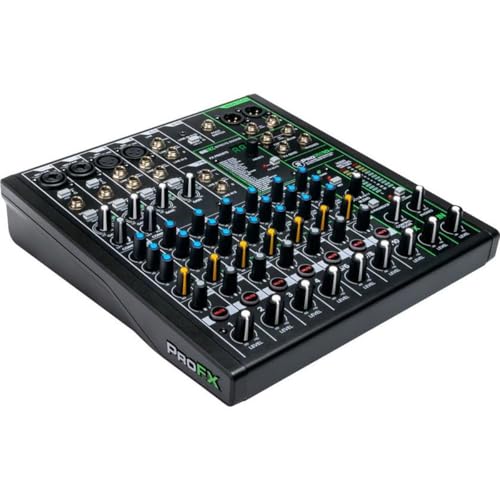
Podcasters, streamers and small bands recording in a project studio are the natural audience for the ProFX10v3. Four Onyx preamps with generous gain handle quiet dynamic microphones that leave lesser mixers hissing, and the GigFX engine supplies reverbs and delays for a vocalist who wants to hear a finished sound in the headphones. The USB connection records at up to 24-bit/192 kHz and offers zero-latency hardware monitoring, so performers hear themselves without delay while the DAW captures the mix. Mackie also bundles Waveform OEM software, which shortens the path from unboxing to a first finished recording session.
Specs
- 10-channel professional effects mixer with USB
- 4 Onyx mic preamps with up to 60 dB of gain
- GigFX effects engine with 24 presets
- 24-bit / 192 kHz 2×4 USB I/O
- Zero-latency hardware monitoring
- Single-knob compression
- Waveform OEM recording software and plugin packages included
Best for: Spoken-word and vocal recording where quiet dynamic microphones need plenty of clean gain.
Watch out for: USB recording is not per-channel multitrack, so verify the routing modes suit how you capture sessions before ordering.
ASIN: B07X8Z1BRG
Soundcraft Notepad-12FX

The Notepad-12FX fits singer-songwriters and small groups who plug in several instruments at once and still want each part captured cleanly. Four Soundcraft preamps anchor the board, two channels accept guitars or bass directly through Hi-Z inputs, and the 4-in/4-out USB interface gives the DAW more than a plain stereo feed, which helps when a vocal and guitar need separate treatment later. Lexicon reverb, chorus and delay with tap tempo add studio polish without plugins. The layout is a traditional channel strip with a master fader, so anyone raised on analog desks feels at home immediately.
Specs
- 12-channel small-format analog mixing console with USB I/O
- 4 Soundcraft mic preamps on combo mic/line inputs, 2 with Hi-Z for instruments
- Lexicon effects: reverb, chorus and delay with tap tempo
- 4-in / 4-out USB audio interface
- 3-band EQ on the channels, aux send and master fader
- +48V phantom power for condenser microphones
- XLR main outputs; durable metal enclosure
Best for: Small ensembles and singer-songwriters who want several sources tracked with some separation in the DAW.
Watch out for: Windows users need the Soundcraft USB driver while Mac works natively, so check your computer setup before the session, not during it.
ASIN: B075SL1VKL
Behringer XENYX 802S

The XENYX 802S is the compact starting point for a first studio desk, a streaming corner or a two-person podcast recorded at home. It keeps the layout simple: two mono channels and two stereo channels with EQ, plus extra stereo inputs for a phone, a media player or a second computer. Its USB connection is built for streaming, sending the finished mix to your software while the RCA input handles background music or a call feed. With up to twelve signals blendable for monitoring, it covers small sessions without the cost or footprint of a full-size console.
Specs
- Premium analog 8-input mixer with USB streaming interface
- 2 mono channels and 2 stereo channels with EQ, plus another stereo channel
- Stereo RCA streaming input and stereo USB input; blends up to 12 signals for monitoring
- XENYX mic preamps
- Main mix outputs on TRS connectors, with headphone monitoring
- Item weight 3.55 pounds; model XENYX 802S
Best for: Beginners and streamers who need one or two microphones plus playback sources on a small desk.
Watch out for: Only two channels carry mic preamps, so count your microphones carefully if the show might add a third voice later.
ASIN: B0C2BTT3DX
Which One Fits Your Situation
You record a singer and a guitar in the same pass
Choose the Yamaha MG10XU. Put the vocal on channel one and the guitar on channel two, and the 1-knob compressors keep both levels tidy without outboard gear. The SPX reverb lets the singer hear a finished space in the headphones while the DAW records the stereo mix, which makes small-room sessions feel far less dry and tentative.
You run a podcast or stream with a co-host
Choose the Mackie ProFX10v3. Its Onyx preamps give quiet dynamic microphones the gain they need without background hiss, and zero-latency monitoring means neither host talks over the other because of delay. The GigFX presets add a touch of room or plate to voices, and the included Waveform software covers recording and editing from day one.
Your band demos songs with everyone playing together
Choose the Soundcraft Notepad-12FX. Four mic preamps cover vocals and amplifiers, the Hi-Z inputs take a guitar and bass directly, and the 4-in/4-out USB interface sends more than a stereo sum to the DAW, so the rough mix can be rebalanced when the song reaches the real session. Lexicon effects keep monitor mixes pleasant during long rehearsals.
You are building a first desk for streaming and lessons
Choose the Behringer XENYX 802S. One microphone for your voice, a stereo channel for the computer, and the RCA streaming input for music or a phone call covers the whole setup, and the USB feed carries the blended result straight into your streaming software. It is the smallest footprint here, which matters on a desk shared with a keyboard and monitor.
Common Mistakes
- Counting total channels instead of mic preamps, then discovering a “10-channel” board only accepts four microphones at once.
- Assuming any USB mixer records multitrack, when most send only the stereo mix and cannot separate sources afterwards.
- Forgetting phantom power: condenser microphones stay silent on a board or channel that cannot supply +48V.
- Recording built-in reverb and compression permanently on every take, leaving nothing clean to work with at mixdown.
- Ignoring headphone monitoring, so performers hear a delayed computer return and their timing drifts against the track.
Frequently Asked Questions
Can a USB mixer record every channel to its own track?
Usually not. Most compact consoles, including the Yamaha MG10XU and Behringer XENYX 802S here, send one stereo mix to the computer. The Soundcraft Notepad-12FX is the exception in this list with a 4-in/4-out interface, which allows limited separation. If full multitrack capture is essential, check the USB specification line before anything else.
Do studio mixers provide phantom power for condenser microphones?
Most do, but it is worth confirming on the exact model and channels. The Yamaha MG10XU, Mackie ProFX10v3 and Soundcraft Notepad-12FX all list +48V phantom power for their mic inputs, which condenser microphones require and dynamic microphones simply ignore. Ribbon microphones are the exception to research separately, as some older designs can be damaged by it.
Is a mixer or an audio interface better for a home studio?
A mixer suits you if you record several sources together, want physical knobs for levels and EQ, or also use the board for rehearsals and small live work. A dedicated interface usually wins on per-channel multitrack recording and compactness. Many small studios start with a USB mixer like these and add an interface later when track counts grow.
How much do sample rate and bit depth matter on a small mixer?
Less than preamp quality and routing. The Yamaha and Mackie here record at up to 24-bit/192 kHz, which exceeds what most home rooms and microphones can resolve, while 24-bit/48 kHz is already the standard for video and streaming work. Spend your attention on clean gain, quiet preamps and the right USB layout instead of chasing the largest numbers.
More from Amazon
Programs that pair well with the guide above. Offers and eligibility are set by Amazon and may change.
Free shipping on eligible items, Prime Video and more. Eligible new members can start with a free trial.
Start a Prime free trialAudiobooks and podcasts to listen to on the go. Eligible new members can start with a free trial.
Try Audible freeAd-free music streaming. Eligible new subscribers can start with a free trial.
Try Music Unlimited freeA free business account with business pricing and bulk-buying tools for work, shop or home office.
Create a business accountAs an Amazon Associate we earn from qualifying purchases.
Write Your Review
No reviews yet. Be the first to share your experience!