

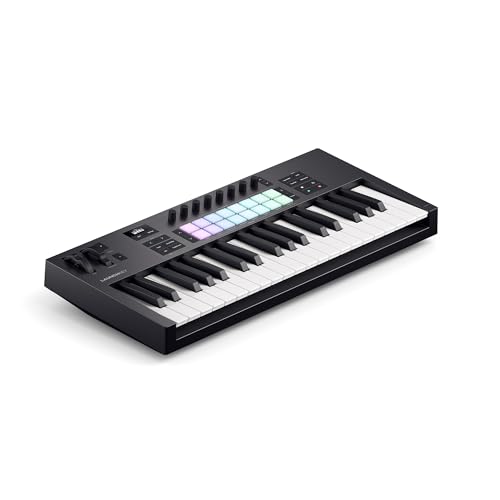
The best 49-key MIDI keyboard for most people in 2026 is the Novation Launchkey 49 MK4, which adds 16 pads, nine faders and an OLED screen to four octaves of semi-weighted keys. For a simpler and cheaper option, the M-Audio Keystation 49 MK3 delivers full-size velocity-sensitive keys, and the Arturia KeyLab Essential 49 mk3 is the pick if you want the most practical control and software. Forty-nine keys is the classic compromise: enough range for chords and basslines with octave buttons, but small enough for a crowded desk or a backpack.
Our top picks


As an Amazon Associate we earn from qualifying purchases at no extra cost to you.
Quick Comparison of 49-Key MIDI Keyboards
| Pick | Best for | Key specs | Price tier |
|---|---|---|---|
| Novation Launchkey 49 MK4 | Best overall | 49 semi-weighted keys, 16 pads with polyphonic aftertouch, 9 faders, OLED display, pitch and mod wheels | Mid-range to upper-mid |
| Arturia KeyLab Essential 49 mk3 | Best software and DAW control | 49 synth-action keys, 8 RGB pads, 9 encoders, 9 faders, Analog Lab V | Mid-range to upper-mid |
| M-Audio Keystation 49 MK3 | Best for beginners | 49 full-size velocity-sensitive keys, transport controls, volume fader, pitch and mod wheels | Budget |
| Nektar SE49 | Best budget pick | 49 keys, four-octave format, DAW integration basics | Budget |
| Alesis V49 MKII | Best value with pads | 49 keys, 8 pads, 4 knobs | Budget to mid-range |
| Roland A-49 | Best for portability and key feel | 49 full-size keys, lightweight body, minimal controls | Mid-range |
Specs follow manufacturers’ published sheets. Check the current revision before you buy.
Best Overall: Novation Launchkey 49 MK4
The Launchkey 49 MK4 is the all-rounder that most producers can grow with. The semi-weighted keys feel better than basic synth-action for chords and piano parts, the 16 pads have polyphonic aftertouch for expressive drumming and clip launching, and nine faders cover mixing. Scale and Chord modes keep you in key, while an arpeggiator speeds up ideas. It integrates tightly with Ableton Live and maps to other DAWs.
Trade-off: it costs more than the budget tier and is deeper than many beginners need.
Best Software and DAW Control: Arturia KeyLab Essential 49 mk3
With 8 RGB pads, 9 encoders and 9 faders, the KeyLab Essential 49 mk3 has more practical control than most boards of this size. Analog Lab V ships with it, giving you a large library of synth and keyboard presets without buying plugins. Scale Mode, Chord Mode and an arpeggiator support quick writing.
Trade-off: no aftertouch, which can matter if you perform expressive synth parts.
Best for Beginners: M-Audio Keystation 49 MK3
The Keystation 49 MK3 is one of the most common first controllers. It provides full-size velocity-sensitive keys, transport controls, a volume fader and pitch and mod wheels. It focuses on the essentials and gets out of the way, which makes it an easy introduction to MIDI recording.
Trade-off: no pads or knobs, so drum programming is done on keys or with the mouse.
Best Budget Pick: Nektar SE49
The Nektar SE49 delivers the four-octave format and DAW integration at the lowest tier. It suits students and home recording setups where a full control surface is unnecessary.
Trade-off: minimal controls, and the build is plainer than higher-priced boards.
Best Value With Pads: Alesis V49 MKII
The V49 MKII adds eight pads and four knobs to a 49-key board at a value price. It is helpful for beat-making, where finger drumming on pads speeds up work. The knobs let you tweak plugins quickly.
Trade-off: reviewers note few encoders and knobs, so it is not a replacement for a full DAW control surface.
Best for Portability and Key Feel: Roland A-49
The Roland A-49 packs 49 full-size keys into a lightweight body with a minimal control set. It has a refined key feel and is easy to carry, which makes it a good traveling companion for a laptop-based setup.
Trade-off: few mixing controls and no large pad bank, so it is a keyboard first.
Is 49 Keys Enough?
Forty-nine keys spans four octaves. With octave up and down buttons, you can reach any pitch, but you cannot play a bass line and a two-handed chord in far-apart registers at once. For single-line melodies, basslines, synth leads and chord stabs, it is plenty. For solo piano pieces, step up to 61 or 88 keys.
How to Choose a 49-Key MIDI Keyboard
Key type
Synth-action keys are light and quick and suit synth players. Semi-weighted keys such as those on Launchkey feel more like a piano. Full-size keys are standard across the boards listed here, so the difference lies in resistance and response.
Pads and faders
Pads give you drum programming and clip launching. Faders map to mixer volumes. If you only record notes, skip them and save money.
Power and size
Most 49-key controllers run on USB bus power and are around 28 to 32 inches wide, which fits on a desk under a monitor. Measure first, especially if you also use a mouse and laptop.
Included software
Bundles can be worth real money. Arturia’s Analog Lab V and Novation’s Ableton Live Lite and Components software give you sounds immediately, while the basic Keystation relies on whatever your DAW provides.
Decision Matrix
| Your priority | Choice | Why |
|---|---|---|
| One controller for keys, pads and mixing | Launchkey 49 MK4 | Pads, faders, display |
| Free sounds in the box | KeyLab Essential 49 mk3 | Analog Lab V |
| First MIDI keyboard | Keystation 49 MK3 | Simple and reliable |
| Lowest cost | Nektar SE49 | Basic four-octave format |
| Beatmaking on a budget | Alesis V49 MKII | Pads plus knobs |
| Travel | Roland A-49 | Light and compact |
Setup Steps for a New Controller
- Update firmware first. Manufacturers fix mapping and display bugs in updates, so run the updater before you set up a DAW.
- Register your software bundle. Licences can expire if you wait too long.
- Select the controller as an input in your DAW. Enable it for track recording and for remote control if your DAW supports it.
- Set the velocity curve. If your playing sounds too soft or too loud, adjust the curve so normal pressure reaches the middle of the range.
- Save a template. A saved project with your preferred instruments loaded saves time on every session.
Worked Example: Fitting 49 Keys on a Small Desk
A 49-key controller is commonly 28 to 32 inches wide and 8 to 11 inches deep, depending on pads and faders. On a 47-inch desk with two monitor speakers, a laptop and a mouse, this leaves enough space for a keyboard in front of the laptop, with speakers on either side. A 61-key board at about 37 to 41 inches often needs a pull-out tray or a dedicated stand. If you must put the board on your lap or on a shelf, the Keystation or Roland A-49 are lighter and easier to move than the Launchkey and KeyLab.
Weight also matters for transport. The lighter boards are easy to carry to a friend’s studio in a backpack-style case; the fader-heavy models need a padded sleeve and a bit more care.
Ownership Realities and Mistakes
The parts most likely to wear are pitch and mod wheels, fader caps and USB ports. Use a short high-quality cable and avoid yanking it. Do not store the board with weight on top, as keys can warp. A common mistake is paying for pads and faders you never map; another is choosing 25 keys to save room and then needing octave buttons constantly. If you want to learn piano seriously, consider 61 keys with semi-weighted action instead.
Frequently Asked Questions
Is a 49-key keyboard good for beginners?
Yes. Forty-nine keys is enough to learn chords, melodies and basic piano technique. If you later want two-handed classical pieces, you may need to upgrade.
Do I need a sound card or audio interface?
A MIDI controller sends notes only. You need a computer or tablet and software instruments to hear sound, and an audio interface helps if you record microphones or want low-latency monitoring.
What is the difference between velocity-sensitive and aftertouch?
Velocity sensitivity measures how fast you press a key. Aftertouch measures how hard you press while holding it. Velocity is standard; aftertouch is a bonus found on higher-end boards and pads.
Can I use these keyboards without a computer?
Not on their own; they have no built-in sounds. Some can connect to a hardware synth or sound module through a MIDI port or adapter, depending on the model.
Which 49-key controller is best for Ableton Live?
The Novation Launchkey 49 MK4 is widely recommended because it is designed around Ableton’s clip view and mixer. Other DAWs also work, but Ableton users see the tightest integration there.

Write Your Review
No reviews yet. Be the first to share your experience!