

Our Top Picks
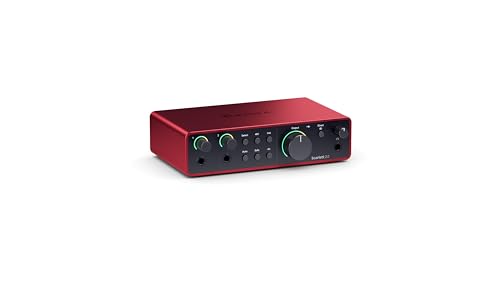 Focusrite Scarlett 2i2 4th Gen USB-C Audio Interface7.09 x 3.9 x 1.79 Inches1.73 poundsCheck on Amazon
 Focusrite Scarlett Solo 4th Gen USB-C Audio Interface1.79 x 5.63 x 3.78 inches0.9 PoundsCheck on Amazon
A USB microphone is the simplest way to record singing, but it locks you into one capsule and one set of electronics. An audio interface separates those jobs: you choose the microphone, and the interface supplies the preamp, phantom power for condenser mics, the converters, and a headphone output for monitoring your voice. For home singers recording covers, running karaoke tracks through a computer, or streaming live vocals, that separation means a dynamic or condenser microphone you already own can sound cleaner, and the mic can be upgraded later without replacing the whole chain.
This guide compares five 2-in, 2-out USB interfaces sold on Amazon that fit a home desk: two Focusrite Scarlett models, the MOTU M2, the PreSonus AudioBox USB 96, and the Behringer U-PHORIA UMC202HD. Each entry covers preamp count and gain, maximum sample rate, monitoring options and MIDI, drawn from the product listings, so you can match a box to your microphone, your instruments and the software you plan to record with.
As an Amazon Associate, we earn from qualifying purchases.
Quick answer
For most home singers, the Focusrite Scarlett 2i2 4th Gen is the default: two preamps with Auto Gain and Clip Safe for clean vocal levels. The Scarlett Solo covers one mic plus an instrument. The MOTU M2 adds LCD metering and MIDI, the PreSonus AudioBox USB 96 pairs two preamps with MIDI at 96 kHz, and the Behringer UMC202HD is the entry-level 192 kHz option.
The five interfaces compared
Focusrite Scarlett 2i2 4th Gen

The 2i2 is the two-preamp version of Focusrite’s fourth-generation Scarlett line, and the most flexible box here for singing households. Two XLR inputs mean a duet partner, a second vocal mic, or a microphone plus a guitar can be recorded at the same time, each with its own gain control. Auto Gain listens to a short sample of your singing or playing and sets the input level for you, while Clip Safe watches for peaks and works to keep a loud chorus from clipping. Air mode adds a presence lift that many singers like on vocals. The headphone output has its own volume control, separate from the monitor level, which helps when tracking at night.
Specs
- Configuration: 2-in / 2-out, USB-C
- Mic preamps: 2 Focusrite 4th-generation
- Preamp gain: 69 dB
- Maximum sample rate: 192 kHz, 24-bit
- Converter dynamic range: 120 dB
- Features: Auto Gain, Clip Safe, Air mode
- Power: USB bus powered
- Item weight: 1.7 pounds
- Included software: Pro Tools Intro+, Ableton Live Lite, Hitmaker Expansion bundle
- Compatibility: macOS, Windows, iOS
Focusrite Scarlett Solo 4th Gen
The Solo keeps the same fourth-generation preamp design and converters as the 2i2 but trims the box to one microphone input plus a dedicated instrument input. That layout fits the most common home singing setup: one vocal mic, with a guitar or keyboard plugged into the second input. It still offers Air mode and the same 120 dB converter dynamic range, and at 14.4 ounces it is the smallest and lightest interface in this guide, so it moves easily between rooms or rides in a laptop bag. The trade-off is fixed: with a single preamp there is no way to record two microphones at once, so duets and stereo mic techniques are off the table.
Specs
- Configuration: 2-in / 2-out, USB-C
- Mic preamps: 1 Focusrite 4th-generation, plus a Hi-Z instrument input
- Preamp gain: 69 dB
- Maximum sample rate: 192 kHz, 24-bit
- Converter dynamic range: 120 dB
- Features: Air mode, independent headphone volume control
- Item weight: 14.4 ounces
- Included: USB A-to-C cable; software bundle with Pro Tools Intro+ and Ableton Live Lite
- Compatibility: macOS, Windows, iOS
MOTU M2

The M2 is the pick for singers who like to see their levels rather than guess them. A full-color LCD on the front panel shows meters for every input and output, which makes setting gain before a loud chorus straightforward. MOTU fits ESS Sabre32 Ultra converters rated at 120 dB dynamic range on the main outputs, and quotes a round trip latency of 2.5 milliseconds at 96 kHz with a 32-sample buffer, a figure that matters when monitoring through software effects such as reverb. It also adds 5-pin MIDI in and out for keyboards, loopback channels for streaming, and balanced outputs mirrored on RCA jacks for consumer speakers.
Specs
- Configuration: 2-in / 2-out, USB-C
- Mic preamps: 2, with individual 48V phantom power switches
- Mic input noise: -129 dBu EIN, per the maker
- Maximum sample rate: 192 kHz, 24-bit
- DAC: ESS Sabre32 Ultra, 120 dB output dynamic range
- Metering: full-color LCD for inputs and outputs
- MIDI: 5-pin in and out
- Extra features: loopback, hardware direct monitoring, TRS and RCA outputs
- Item weight: 612 grams
- Included software: MOTU Performer Lite, Ableton Live Lite
PreSonus AudioBox USB 96 25th Anniversary Edition
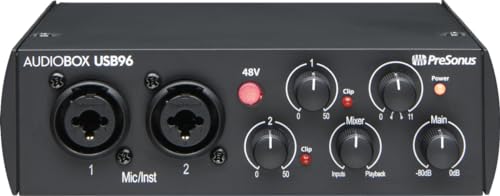
The AudioBox USB 96 is the workhorse option: two Class-A preamps in a steel chassis, plus MIDI in and out, at the cost of a 96 kHz sample rate ceiling where the other boxes here reach 192 kHz. For vocals and karaoke recording that ceiling is rarely a practical limit, since most projects are tracked at 44.1 or 48 kHz. A front-panel Mix knob blends the live input with computer playback, giving latency-free monitoring without opening software settings. It connects over USB 2.0 with the older USB-B connector, and it bundles Studio One Artist, so a buyer with no recording software yet can start right away. The Anniversary edition wears a matte black finish in place of the silver faceplate of the original model.
Specs
- Configuration: 2-in / 2-out, USB 2.0
- Mic preamps: 2 Class-A, combo mic/instrument inputs
- Maximum sample rate: 96 kHz, 24-bit
- MIDI: 5-pin in and out
- Monitoring: front-panel Mix knob for input and playback blend
- Chassis: steel
- Dimensions: 5.5 x 5.5 x 1.75 inches
- Item weight: 2.01 pounds
- Included software: Studio One Artist, Studio Magic plug-in suite
- Compatibility: Windows, macOS; USB class-compliant
Behringer U-PHORIA UMC202HD

The UMC202HD is the entry-level route into XLR recording in this group. Its two Midas-designed preamps include +48V phantom power for condenser microphones, and the converters run to 24-bit/192 kHz, matching the Focusrite and MOTU boxes on resolution. A direct monitoring control lets you hear your voice without perceptible delay while a karaoke backing track plays from the computer. What this model leaves out is MIDI, so it suits singers and guitarists rather than keyboard rigs. The metal chassis and simple layout have kept it in production for years, and it works with the major recording programs on Windows and macOS.
Specs
- Configuration: 2-in / 2-out, USB 2.0
- Mic preamps: 2 Midas-designed, combo XLR/TRS inputs
- Phantom power: +48V for condenser microphones
- Maximum sample rate: 192 kHz, 24-bit
- Monitoring: direct monitoring mix control
- Chassis: metal
- Item weight: 1.19 pounds
- Compatibility: Windows, macOS
- MIDI I/O: confirm on the listing
How to choose
Start with microphone count. One singer recording alone can use a single-preamp box like the Scarlett Solo, but duets, a vocal mic plus a room mic, or mic-and-guitar takes recorded together need two preamps. Next, check phantom power: condenser microphones require +48V, and every interface here provides it, while dynamic mics run without it. Preamp gain matters for quiet dynamic microphones used at a distance; the fourth-generation Scarlett preamps offer 69 dB, the highest figure in this group.
Sample rate is less decisive than it looks. Vocal projects are usually recorded at 44.1 or 48 kHz, so the AudioBox ceiling of 96 kHz is not a real-world handicap for singing, while 192 kHz models give more headroom for certain production work. Monitoring deserves attention if you sing along to backing tracks: a hardware direct-monitor control or blend knob avoids echo-like delay, and streamers should look for loopback, offered by the MOTU M2. Keyboard players should confirm MIDI ports, present on the M2 and the AudioBox. Finally, weigh the bundled software: an included DAW such as Studio One Artist or Ableton Live Lite saves a separate purchase for a first setup, and check the port on the back, since a USB-C model may still need an adapter for older laptops or tablets.
Who should skip
Skip an interface if a USB microphone already covers your needs and you never plan to swap microphones; the extra box only adds setup steps. Skip these five if you record on a phone alone, since each one is built around a computer connection, even where tablet use is possible with adapters. Anyone who needs three or more microphones at once, for a group sing-along or a small choir, should look at four-input interfaces instead. And if your karaoke setup is just a speaker with a wireless mic for parties, an interface adds nothing: it makes no sound on its own and needs a computer, headphones or speakers to be heard.
Frequently asked questions
Can I use an audio interface with karaoke apps and backing tracks?
Yes. Route the app or browser playback to the interface outputs, plug your microphone into an input, and monitor the blend through headphones or speakers. A direct monitoring control keeps your voice in time with the track, and recording software can capture the vocal on its own track for later mixing.
Does my microphone need phantom power?
Condenser microphones need +48V phantom power, which all five interfaces here supply. Dynamic microphones, including most handheld stage mics used for karaoke, do not need it and are not harmed by leaving it off. Check the microphone maker’s notes if you use a ribbon microphone, since older ribbon designs can be sensitive to phantom power.
Is 96 kHz enough, or should I insist on 192 kHz?
For singing, 96 kHz is more than enough. Most vocal recording happens at 44.1 or 48 kHz, and the audible differences between these interfaces come from preamp quality and noise, not the top sample rate. Higher rates mainly help specialized production work and create larger files, so treat 192 kHz as a bonus rather than a requirement.
Can I record a guitar and a microphone at the same time?
On the two-preamp models, yes: each combo input accepts a microphone or an instrument, so a guitar and a vocal mic can be tracked together. The Scarlett Solo is built for exactly this pairing as well, with one dedicated mic input and one instrument input, but it cannot take a second microphone later.
Final verdict
For a first interface aimed at singing, the Scarlett 2i2 4th Gen is the safest all-round choice, with the Solo as its smaller single-mic sibling. The MOTU M2 earns its place for metering, MIDI and converter quality, the AudioBox USB 96 covers singers who also play MIDI keyboards and want a DAW in the box, and the UMC202HD keeps the cost of entry low for a 192 kHz two-preamp setup. Match the preamp count and monitoring style to how you actually sing, and any of the five will serve a home setup well.
Product and ASIN Reference
| Product | ASIN |
|---|---|
| Focusrite Scarlett 2i2 4th Gen | B0C5JRTS3Y |
| Focusrite Scarlett Solo 4th Gen | B0C5JSHP7M |
| MOTU M2 | B0812B26TN |
| PreSonus AudioBox USB 96 25th Anniversary Edition | B08D8R6VFC |
| Behringer U-PHORIA UMC202HD | B00SAV0VP0 |
More from Amazon
Programs that pair well with the guide above. Offers and eligibility are set by Amazon and may change.
Free shipping on eligible items, Prime Video and more. Eligible new members can start with a free trial.
Start a Prime free trialAudiobooks and podcasts to listen to on the go. Eligible new members can start with a free trial.
Try Audible freeAd-free music streaming. Eligible new subscribers can start with a free trial.
Try Music Unlimited freeA free business account with business pricing and bulk-buying tools for work, shop or home office.
Create a business accountAs an Amazon Associate we earn from qualifying purchases.
Write Your Review
No reviews yet. Be the first to share your experience!