
Our Short List of 3
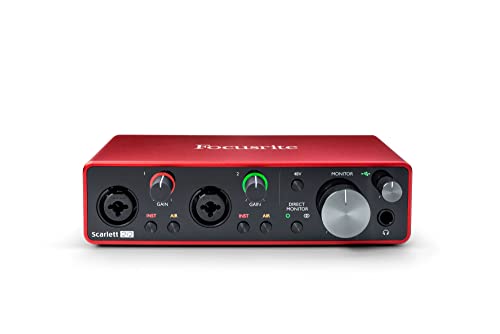
- Best for: Recording two sources at once, such as a vocal and a guitar.
- Two mic/line/instrument inputs with upgraded Scarlett mic preamps
- 24-bit/192kHz converters
- USB Type-C connection
- Switchable Air mode on the mic preamps

- Best for: Solo vocal and guitar takes in a small room.
- One upgraded third-generation Scarlett mic preamp with switchable Air setting
- 24-bit/192kHz AD-DA converters
- High-impedance, high-headroom instrument input
- Gain Halo metering
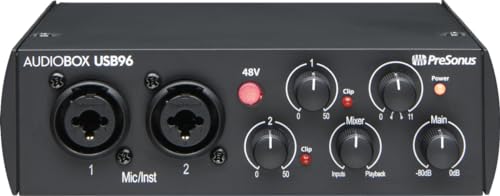
- Best for: A first home studio that wants recording software in the box.
- 24-bit/96 kHz resolution
- Two combo mic/instrument inputs
- 48V phantom power
- MIDI in and out
All 5 Picks at a Glance
| Product | Specs | Action |
|---|---|---|
| Focusrite Scarlett 2i2 3rd Gen USB Audio Interface for Recording, Songwriting, Streaming and Podcasting — High-Fidelity, Studio Quality Recording, and All the Software You Need to Record |
| Check price on Amazon |
| Focusrite Scarlett Solo 3rd Gen USB Audio Interface for Guitarists, Vocalists, Podcasters or Producers to record and playback studio quality sound |
| Check price on Amazon |
| PreSonus AudioBox 96 25th Anniversary USB Audio Interface with Studio One Artist DAW Recording Software |
| Check price on Amazon |
 Behringer UMC22 Audiophile 2×2, 48 kHz USB Audio Interface with Midas Mic Preamplifier |
| Check price on Amazon |
 Audient Audio Interface iD4 MKII, Class A Console Microphone Preamp (High Speed USB-C, Monitor Mix and Monitor Panning Function, 2 Headphone Outputs, Mac/PC/iOS Compatible), Black |
| Check price on Amazon |
Key takeaways
- Clean recordings begin with the right sound card. Compare five audio recording sound cards with low-latency drivers, clear preamps and solid inputs.
A microphone can only capture what the box between it and your computer allows through. A recording sound card, also called a USB audio interface, turns the faint signal from a microphone or guitar into clean digital audio, adds phantom power for condenser microphones, and sends sound back to your headphones and speakers without hum or hiss. Pick the wrong one and every vocal take carries noise you cannot remove later. Pick the right one and the chain disappears, leaving only the performance.
The five interfaces below all connect over USB, carry at least one microphone preamp with phantom power, and work with common recording software on Mac and Windows. They differ in input count, converter resolution, and the extras in the box, from bundled software to a second headphone output. Use the comparison table to narrow the field, then read the section that matches how you record.
Quick Picks
As an Amazon Associate we earn from qualifying purchases
| Product | Best for | Key spec from title |
|---|---|---|
| Focusrite Scarlett 2i2 3rd Gen USB Audio Interface for Recording, Songwriting, Streaming and Podcasting — High-Fidelity, Studio Quality Recording, and All the Software You Need to Record | Two-mic sessions | High-Fidelity, Studio Quality Recording |
| Focusrite Scarlett Solo 3rd Gen USB Audio Interface for Guitarists, Vocalists, Podcasters or Producers to record and playback studio quality sound | Solo vocal and guitar takes | Studio quality sound |
| PreSonus AudioBox 96 25th Anniversary USB Audio Interface with Studio One Artist DAW Recording Software | Bundled recording software | Studio One Artist DAW Recording Software |
| Behringer UMC22 Audiophile 2×2, 48 kHz USB Audio Interface with Midas Mic Preamplifier | A compact first interface | 48 kHz USB Audio Interface |
| Audient Audio Interface iD4 MKII, Class A Console Microphone Preamp (High Speed USB-C, Monitor Mix and Monitor Panning Function, 2 Headphone Outputs, Mac/PC/iOS Compatible), Black | Console-style preamp in a small box | Class A Console Microphone Preamp |
How to Choose
Input Count and Preamps
Count the sources you record at the same time before you look at anything else. One microphone plus one guitar needs two inputs, while a vocal and an acoustic guitar tracked together need the same pair, so a two-input interface covers most home sessions. Each input should have its own gain knob and a microphone preamp that stays clean when you turn it up, because a noisy preamp adds hiss that no plugin removes. Phantom power matters if you own or plan to own a condenser microphone, so confirm the interface supplies 48V. A separate instrument input with high impedance keeps a guitar or bass sounding full instead of thin.
Converter Resolution and Latency
Resolution sets how much detail the interface captures, and the number to look for is the sample rate paired with bit depth. A 24-bit converter at 48 kHz handles voice, guitar, and podcast work with room to spare, while 96 kHz and 192 kHz options suit sessions where you plan processing later. Higher numbers alone do not guarantee a better take, since the analog stage in front of the converter matters just as much. Latency is the delay between playing a note and hearing it back, and a good driver keeps that delay short enough that monitoring feels natural. Look for interfaces that pair low-latency drivers with a direct monitor path, so you can hear yourself without an echo.
Connections and Monitoring
Outputs decide what you hear and how you hear it. Balanced line outputs feed studio monitors without picking up hum, while a headphone output with its volume knob lets you monitor in private. A second headphone output helps when two people share a session, and a monitor mix knob blends the live input with playback from your computer, which keeps vocals in time with the backing track. Check the connector on the back of the unit: USB-C is the standard, and a bus-powered unit draws its power from the same cable, so your desk stays free of adapters. MIDI ports matter only if you play a keyboard controller, so do not pay for them when you record audio alone.
Software and System Fit
Bundled software can save a purchase, but only when the programs match how you work. Some interfaces ship with a full digital audio workstation and a set of plugins, while others include a lighter edition that covers the basics and leaves room to grow. Confirm the interface works with your computer before you buy: most units here support Mac and Windows, and several also connect to an iPad or iPhone. Check that your recording program recognizes the interface, and that the maker updates drivers for your system. A unit that fits your computer and your software on day one avoids a return, and it keeps attention on the music instead of on setup chores.
The 5 Best Options
Focusrite Scarlett 2i2 3rd Gen USB Audio Interface for Recording, Songwriting, Streaming and Podcasting — High-Fidelity, Studio Quality Recording, and All the Software You Need to Record
- Best for: Recording two sources at once, such as a vocal and a guitar.
- Two mic/line/instrument inputs with upgraded Scarlett mic preamps
- 24-bit/192kHz converters
- USB Type-C connection
- Switchable Air mode on the mic preamps
Recording two sources at once, such as a vocal and a guitar.
It has no MIDI ports, so a keyboard controller needs a separate connection.
The Scarlett 2i2 3rd Gen is the two-input interface that most home studios settle on, and its balance of clean preamps and simple controls explains why. Two upgraded Scarlett mic preamps sit behind combo inputs that accept microphones, line sources, and instruments, with Air mode adding brightness to vocals and acoustic parts. Gain Halo metering around each gain knob shows green, amber, and red, so setting levels is quick even in a dim room. The unit runs on bus power over USB-C, carries two balanced outputs for monitors, and ships with a software bundle that covers recording, mixing, and mastering basics.
Watch out for: It has no MIDI ports, so a keyboard controller needs a separate connection.
Focusrite Scarlett Solo 3rd Gen USB Audio Interface for Guitarists, Vocalists, Podcasters or Producers to record and playback studio quality sound
- Best for: Solo vocal and guitar takes in a small room.
- One upgraded third-generation Scarlett mic preamp with switchable Air setting
- 24-bit/192kHz AD-DA converters
- High-impedance, high-headroom instrument input
- Gain Halo metering
Solo vocal and guitar takes in a small room.
It records one microphone at a time, so duets need a two-input interface.
The Scarlett Solo 3rd Gen suits a singer-songwriter who records one source at a time and wants the quickest path from idea to finished take. A single upgraded Scarlett mic preamp with a switchable Air setting sits beside a high-headroom instrument input, so a vocal and a guitar can share the same small box across separate passes. The 24-bit/192kHz converters keep the sound clean, Gain Halo metering makes level setting obvious, and the balanced outputs feed monitors without hum. Everything runs from USB-C power, and the included software bundle covers the first songs end to end.
Watch out for: It records one microphone at a time, so duets need a two-input interface.
PreSonus AudioBox 96 25th Anniversary USB Audio Interface with Studio One Artist DAW Recording Software
- Best for: A first home studio that wants recording software in the box.
- 24-bit/96 kHz resolution
- Two combo mic/instrument inputs
- 48V phantom power
- MIDI in and out
A first home studio that wants recording software in the box.
It records at up to 96 kHz, so sessions at 192 kHz need a different interface.
The PreSonus AudioBox 96 25th Anniversary edition pairs a rugged two-channel interface with Studio One Artist, so a new studio can open its first session minutes after unboxing. Two combo inputs take microphones or instruments, dual preamps keep the signal clean, and a Mixer knob blends live input with playback for comfortable monitoring. The 24-bit/96 kHz converters handle voice, guitar, and podcast work with ease, while MIDI in and out connect a keyboard controller without extra hardware. Bus power over USB 2.0 keeps the desk free of extra adapters, and the compact box travels well between rooms.
Watch out for: It records at up to 96 kHz, so sessions at 192 kHz need a different interface.
Behringer UMC22 Audiophile 2×2, 48 kHz USB Audio Interface with Midas Mic Preamplifier
- Best for: A compact first interface for one microphone and one instrument.
- 2×2 USB audio interface for recording microphones and instruments
- 48 kHz resolution
- MIDAS mic preamplifier
- +48V phantom power
A compact first interface for one microphone and one instrument.
It has a single microphone input, so two microphones at once need a bigger unit.
The Behringer UMC22 is the smallest outlay in this roundup, and it covers the essentials without fuss: one microphone input with a MIDAS-designed preamp, one instrument input, and a headphone output for monitoring. The 48 kHz converters suit voice, guitar, and podcast sessions, and the Direct Monitor switch lets you hear yourself without delay while you play. Phantom power on the rear panel runs a condenser microphone, and the unit draws power from its USB cable, so nothing else needs a socket. For a desk that hosts one microphone and one instrument, the UMC22 does the job with room to spare.
Watch out for: It has a single microphone input, so two microphones at once need a bigger unit.
Audient Audio Interface iD4 MKII, Class A Console Microphone Preamp (High Speed USB-C, Monitor Mix and Monitor Panning Function, 2 Headphone Outputs, Mac/PC/iOS Compatible), Black
- Best for: Vocal takes that benefit from a console-style preamp.
- Class A console microphone preamp
- High-speed USB-C connection
- Monitor Mix and Monitor Panning functions
- Two headphone outputs
Vocal takes that benefit from a console-style preamp.
It has one microphone input, so a second voice needs another interface or a mixer.
The Audient iD4 MKII brings a console-style preamp to a desktop box, and the difference shows in vocal takes that sound open and present. A Class A console microphone preamp feeds one combo input, a JFET instrument input takes a guitar or bass direct, and dual headphone outputs let two listeners share a session. Monitor Mix and Monitor Panning controls shape what you hear, the ScrollControl knob doubles as a handy control for your recording program, and the 96 kHz converters keep detail intact. High-speed USB-C power and an all-metal housing round out a unit built for daily use.
Watch out for: It has one microphone input, so a second voice needs another interface or a mixer.
Which One Fits Your Situation
Recording a Vocal and a Guitar Together
Pick the Scarlett 2i2 3rd Gen. Two combo inputs with their own gain knobs let a vocal and a guitar land on separate tracks in one pass, and Air mode adds lift to both. The balanced outputs feed monitors for honest playback, and the bundled software covers the whole session. If your songs pair a voice with an instrument, the extra input earns its place on your desk.
Recording Alone in a Small Room
Pick the Scarlett Solo 3rd Gen or the Audient iD4 MKII. Both are single-microphone interfaces with clean preamps, clear metering, and a small footprint that leaves desk space for a notebook and a guitar. The Solo keeps the layout simple and the software bundle generous, while the iD4 MKII adds a console-style preamp and a second headphone output. Either one suits a bedroom studio where one voice or one instrument is the whole session.
Building a First Home Studio with Software Included
Pick the PreSonus AudioBox 96 25th Anniversary edition. Studio One Artist arrives in the box, so the first session needs no extra purchase, and the two inputs cover a microphone plus a guitar or keyboard. MIDI ports connect a controller for virtual instruments, and the Mixer knob keeps monitoring comfortable while you learn the program. It is the most complete single purchase for someone setting up a studio from scratch.
Keeping the Desk Simple on a Tight Budget
Pick the Behringer UMC22. It gives you a microphone input with a MIDAS preamp, an instrument input, phantom power, and direct monitoring in a box that fits beside a laptop. There is nothing extra to learn and nothing extra to plug in, since USB power runs the whole unit. If one microphone and one instrument cover your sessions, the UMC22 keeps the chain short and the desk clear.
Common Mistakes
- Buying an interface with fewer inputs than your usual session needs, then juggling takes to work around it.
- Skipping phantom power when your microphone is a condenser, which leaves the microphone silent.
- Setting gain by ear alone instead of watching the meter, which invites clipping or a faint take.
- Monitoring through laptop speakers while you record, which hides noise until the mix.
- Ignoring driver updates, which can leave a good interface misbehaving on a new system.
Frequently Asked Questions
What is a recording sound card?
A recording sound card, also called a USB audio interface, connects microphones and instruments to a computer and turns their signals into digital audio. It adds microphone preamps, phantom power, and headphone and monitor outputs that a laptop alone lacks. The result is cleaner takes, lower noise, and proper monitoring while you record.
Do I need phantom power for my microphone?
Condenser microphones need 48V phantom power to work, while most dynamic microphones do not. Every interface in this guide supplies phantom power, so a condenser microphone will run on any of the five. Check your microphone type before you buy: if it is a condenser, confirm the interface has a phantom power switch, and keep it off for dynamic microphones that do not need it.
Can I record a guitar and a vocal at the same time?
Yes, when the interface has two inputs. The Scarlett 2i2 3rd Gen and the PreSonus AudioBox 96 both take a microphone and an instrument at once, with a separate gain knob for each. Single-input interfaces like the Solo, the UMC22, and the iD4 MKII record one source per pass, so a duet needs two passes or a two-input unit.
Will these interfaces work with my recording software?
All five connect as standard USB audio devices, so common recording programs on Mac and Windows recognize them without fuss. Each one ships with software in the box, and the bundled programs cover recording, editing, and mixing for a home session. Install the maker driver first, select the interface as your input and output device, and your program will see every input the unit offers.
More from Amazon
Programs that pair well with the guide above. Offers and eligibility are set by Amazon and may change.
Free shipping on eligible items, Prime Video and more. Eligible new members can start with a free trial.
Start a Prime free trialAudiobooks and podcasts to listen to on the go. Eligible new members can start with a free trial.
Try Audible freeAd-free music streaming. Eligible new subscribers can start with a free trial.
Try Music Unlimited freeA free business account with business pricing and bulk-buying tools for work, shop or home office.
Create a business accountAs an Amazon Associate we earn from qualifying purchases.
Write Your Review
No reviews yet. Be the first to share your experience!