

Key takeaways
- Decouple your monitors from the desk with the right isolation pads. Compare pad sizes, load limits, tilt wedges and foam density for a home studio.
Set a pair of studio monitors straight onto a desk and the desk joins the band. Every bass note sends cabinet vibration into the desktop, the desktop answers with buzzes and rattles of its own, and the low end you hear while mixing a karaoke backing track or a home recording is part speaker, part furniture. That extra resonance can fool you into cutting bass that is not really there, or leaving in mud that only shows up on other systems.
Monitor isolation pads break that mechanical link. A layer of dense foam or silicone sits between the cabinet and the surface, absorbing vibration before it reaches the desk, and most designs add a small lift or tilt so the tweeters point closer to ear level. This guide compares five current pad options by the things that actually decide a purchase: footprint against your monitor base, stated load capacity, tilt range, and material. None of them will fix a bad room, but the right pad is a cheap, reversible way to hear your monitors instead of your furniture.
As an Amazon Associate, we earn from qualifying purchases.
Quick Answer
For most five-inch monitors on a desk, the Sound Addicted SMPad 5 is the straightforward pick: a stated footprint, a stated load limit, and five angle setups in one pair. The Auralex MoPAD remains the flexible classic for mixed cabinet sizes, the LyxPro MNS-4 suits five- and eight-inch monitors, the Pyle PSI03 carries heavier speakers, and the Hudson Hi-Fi silicone pads fit small gear that foam blocks would swamp.
1. Sound Addicted SMPad 5
The SMPad 5 is the pad pair most home studios end up measuring first, because the listing states its numbers plainly. Each pad measures 7.5 by 11 by 1.6 inches, a surface sized for the five-inch monitor class that covers the most common nearfield cabinets. The foam is rated at 50 kilograms per cubic meter in density, firm enough that the maker states a 24-pound capacity per pad without the foam changing shape.
Because each pad is built in sections, you can run the pair flat or rearrange the pieces into angled configurations, five setups in total including flat. That matters on a desk, where monitors usually sit below ear level and a slight upward tilt aims the tweeters at your head. If your monitors are five-inch models and your desk has the depth for an 11-inch pad, this is the pair to beat.
Specs
- Pack: Pair of two pads
- Pad size: 7.5 x 11 x 1.6 inches each
- Material: High-density acoustic foam, 50 kg/m3
- Stated capacity: 24 lb per pad
- Angle options: Five configurations including flat
- Best fit: Five-inch studio monitors
2. Auralex Acoustics MoPAD

The MoPAD is the design that defined this category, and its split-pad layout still solves a problem one-piece pads cannot. Instead of a single block, each monitor rests on two narrow base pads, each 12 inches long and 4 inches wide, so you spread them to match the cabinet or turn a monitor on its side for horizontal placement. Four base pieces and four wedge pieces cover a stereo pair.
Slip the wedges under the bases and the tilt changes in fixed steps: flat, four degrees, or eight degrees, aimed up from a low desk or down from a high shelf. Auralex rates the set to support up to 100 pounds per monitor, far beyond nearfield weights, which makes the MoPAD a safe default under heavier bookshelf speakers too. The trade-off is height: the stacked pieces add about two inches, and the two-strip layout takes a minute longer to position than a single pad. For odd-sized cabinets, that flexibility is the point.
Specs
- Pack: Four base pads plus four wedge pieces, for two monitors
- Base pad size: 12 x 4 x 1 inches each
- Material: High-density acoustic foam, charcoal
- Stated capacity: Up to 100 lb per monitor
- Angle options: Flat, plus 4-degree and 8-degree tilts up or down
- Best fit: Mixed cabinet sizes, horizontal monitors, heavier speakers
3. LyxPro MNS-4

LyxPro takes the same two-component idea and packages it for slightly larger rigs. The MNS-4 box holds four isolation pads and four wedge inserts, again one pair of pads per monitor, in a high-density acoustic foam positioned for both five-inch and eight-inch studio monitors. If your cabinets are a step up from the compact five-inch class, this is the two-piece design sized with them in mind.
The wedge inserts tilt a monitor up to eight degrees in either direction, enough to correct the usual desk-height mismatch without a separate stand. LyxPro also states a one-year warranty on the set, a detail most foam pads skip. The pads carry no stated load figure in the material published with them, so check the current listing before pairing them with unusually heavy cabinets.
Specs
- Pack: Four isolation pads plus four wedge inserts, for two monitors
- Pad size: Confirm on the listing
- Material: High-density acoustic foam, two-component design
- Stated capacity: Confirm on the listing
- Angle options: Tilt up to 8 degrees up or down
- Warranty: One year, as stated by the maker
- Best fit: Five-inch and eight-inch studio monitors
4. Pyle PSI03

The PSI03 is the heavy lifter of this group. Sold as a pair of solid riser platforms rather than split strips, each pad measures 9 by 12 by 2 inches and is rated by Pyle to hold up to 33 pounds, with a rubber base pad underneath to keep the platform from creeping across a polished desk or shelf.
Flip or reverse a riser and the speaker angle changes, giving three placement angles from the same pair. That single-piece design is also the simplest to live with: no wedges to lose, no strips to align, just two platforms that work under studio monitors, shelf speakers, and smaller subwoofers alike. The footprint needs a desk that can spare 12 inches of depth per side, which rules it out for the shallowest setups. Where space allows, it is the pick for heavier speakers.
Specs
- Pack: Pair of two riser platforms
- Pad size: 9 x 12 x 2 inches each
- Material: High-density engineered foam with rubber base pad
- Stated capacity: 33 lb per riser
- Angle options: Three placement angles, reversible design
- Best fit: Heavier monitors, shelf speakers, small subwoofers
5. Hudson Hi-Fi Platinum Silicone Isolation Pads, 1 Inch, 8-Pack
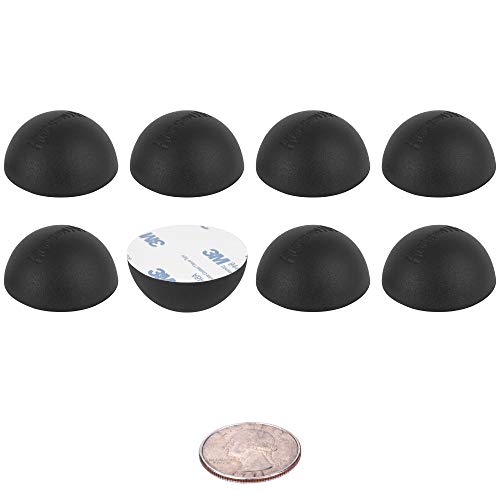
Not every isolation job involves a monitor. Interfaces, small desktop speakers, turntables, and karaoke mixers all pass vibration into a desk, and a full foam platform is oversized for them. Hudson Hi-Fi answers with hemispheres of platinum-cured silicone: this pack holds eight one-inch pads with adhesive backing, rated at a soft 20 durometer, that stick under the corners of a cabinet or component.
Silicone behaves differently from foam. It does not crumble or permanently flatten the same way, and the maker rates the material across a wide temperature range, from minus 40 to plus 240 degrees Celsius. The load each pad carries depends on its diameter and durometer, and this one-inch size is the light-duty end of the range, meant for small gear rather than a pair of eight-inch monitors. Check the per-pad load figure on the current listing and match the pad count to your cabinet weight.
Specs
- Pack: Eight isolation pads
- Pad size: 1 inch diameter hemispheres
- Material: Platinum silicone, 20 durometer
- Stated capacity: Confirm on the listing for this size
- Attachment: Adhesive backing
- Best fit: Small speakers, interfaces, turntables, and desktop audio gear
How to Choose Monitor Isolation Pads
Start with a tape measure, not a product name. Measure the base of your monitor cabinet and compare it with the pad footprint: the cabinet should sit fully on the pad, because an overhanging edge concentrates weight and can slowly bend a foam pad out of shape. Listings describe fit by woofer size, but cabinets with the same woofer differ in width and depth, so the stated pad dimensions are the figure to trust.
Next, check the stated load capacity against your monitor’s weight, which the speaker maker publishes. A pad loaded far beyond its rating compresses until it stops isolating, while a very light monitor on a very firm pad barely compresses it at all. Then think about height and angle. If your tweeters already sit at ear level, a flat pad is enough. If the monitors fire at your chest from a low desk, choose a design with wedges or a reversible riser and enough tilt to aim them up. Finally, match the format to the furniture: split strips suit stands and odd cabinets, one-piece platforms suit desks, and silicone feet suit small components.
Who Should Skip Monitor Isolation Pads
Skip pads if your monitors already sit on proper floor stands at ear height, because there is no desk in the path to decouple them from. Skip them if the problem you hear is really the room: boomy corners and flutter echo come from reflections, and pads do nothing for those. Skip foam pads under very heavy floor-standing speakers, which need rated isolation feet built for that load instead. And skip them as a first purchase for a new setup; place the monitors correctly first, and only then decide whether the surface under them adds noise you can hear.
FAQ
Do isolation pads change how monitors sound?
They change what the desk adds, not what the speaker produces. By absorbing cabinet vibration before it reaches the surface, pads reduce buzzes, rattles, and the false low-end emphasis a resonant desktop can add. Expect a cleaner presentation of the same monitor rather than a different one.
What size pad does a five-inch monitor need?
Match the pad to the cabinet base, not the woofer label. Most five-inch monitors sit well on a pad around 7.5 by 11 inches, like the SMPad 5, but measure your cabinet’s width and depth first. The whole base should rest on the pad with no overhang.
Can isolation pads replace monitor stands?
Only partly. Pads decouple and add a small amount of height and tilt, which is enough when a desk places tweeters just below ear level. If your monitors sit far below your ears, or you need them off the desk entirely, stands solve a placement problem that no pad can.
How long do foam isolation pads last?
Foam slowly compresses under constant load, and makers rarely state a service life. A pad that has flattened unevenly, crumbled at the edges, or lets a monitor rock is due for replacement. Silicone pads resist that compression better, which is one reason they suit small gear that stays in place for years.
Final Verdict
For a typical home studio desk, start with the Sound Addicted SMPad 5: honest stated dimensions, a stated load limit, and tilt options that cover the usual five-inch setup. Choose the Auralex MoPAD when your cabinets are wide, horizontal, or heavy, and the LyxPro MNS-4 when an eight-inch monitor needs the two-piece treatment with a stated warranty. The Pyle PSI03 is the sturdy platform for heavier speakers on a roomy desk, and the Hudson Hi-Fi silicone pads handle the small gear that foam platforms would bury.
Product and ASIN Reference
| Product | ASIN |
|---|---|
| Sound Addicted SMPad 5 Studio Monitor Isolation Pads | B01GROP5K2 |
| Auralex Acoustics MoPAD Monitor Isolation Pads | B0002D0B4K |
| LyxPro MNS-4 Studio Monitor Isolation Pads | B00OO30CDE |
| Pyle PSI03 Sound Dampening Speaker Riser Foam | B00SVRLQSE |
| Hudson Hi-Fi Platinum Silicone Isolation Pads, 1 Inch, 8-Pack | B075KM5Y8W |
More from Amazon
Programs that pair well with the guide above. Offers and eligibility are set by Amazon and may change.
Free shipping on eligible items, Prime Video and more. Eligible new members can start with a free trial.
Start a Prime free trialAudiobooks and podcasts to listen to on the go. Eligible new members can start with a free trial.
Try Audible freeAd-free music streaming. Eligible new subscribers can start with a free trial.
Try Music Unlimited freeA free business account with business pricing and bulk-buying tools for work, shop or home office.
Create a business accountAs an Amazon Associate we earn from qualifying purchases.


Write Your Review
No reviews yet. Be the first to share your experience!