

Key takeaways
- Using a USB microphone with a mixer without checking. Match connectors to your setup.
- Setting echo too high. It makes lyrics hard to understand.
- Placing speakers behind singers. This invites feedback.
- Relying on weak laptop speakers. They will not fill a room.
- Ignoring cable management. Loose cables are a hazard.
To set up karaoke at home, connect a streaming device to your TV for lyrics, route the audio and microphones through a small mixer or a karaoke-ready speaker, then set microphone and echo levels so voices sit clearly over the music. A basic setup can be done in an afternoon with a handful of cables and modest equipment.
| Pick | Best for | Key feature |
|---|---|---|
| Amazon Fire TV Stick 4K Max | Streaming karaoke videos to a TV | Fast streaming with common karaoke apps |
| Behringer Xenyx Q502USB mixer | Blending voices and music | Small mixer with microphone inputs and effects |
| Mackie CR3.5BT monitors | Clear desktop-sized speakers | Compact speakers with Bluetooth |
| Fifine K669B microphone | An inexpensive first microphone | USB dynamic microphone for home use |
| Hosa microphone cable | Reliable connections | Balanced XLR cable that reduces noise |
Step 1: Decide on your setup type
There are three common routes. The simplest is a karaoke speaker with built-in microphone inputs, which needs only a phone or TV for lyrics. The second is a streaming device on a TV, with audio fed into a soundbar or a small PA. The third is a mixer-based system that blends microphone and music signals, which gives the most control. Pick the one that matches your budget and patience.
Step 2: Get the lyrics on screen
A streaming stick such as the Amazon Fire TV Stick 4K Max plugs into a TV and gives you access to karaoke apps and video platforms. Search for karaoke versions of songs, which show lyrics with a bouncing highlight. Position the TV where singers and the audience can see it. Check that the screen is easy to read from the sofa.
Step 3: Choose how audio flows
Option A: Karaoke speaker
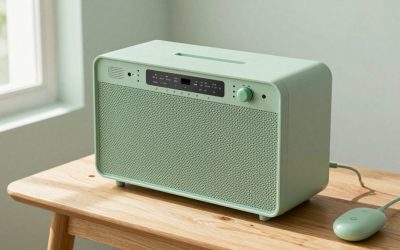
Plug microphones into the speaker, pair it with your phone and play the music. This is the simplest and requires the fewest cables.
Option B: Mixer and speakers
For better control, use a small mixer such as the Behringer Xenyx Q502USB mixer. Plug the microphone into an input channel, send the music from the TV or phone into another channel and connect the mixer output to your speakers. Powered monitors like the Mackie CR3.5BT monitors are compact and offer clear sound for a small room. The mixer lets you set separate volumes for each microphone and the music, and add reverb.
Option C: Soundbar or home theater
Some soundbars have microphone inputs or can be paired with a mixer. This route uses equipment you may already own, but it may offer less microphone control.
Step 4: Pick and connect microphones
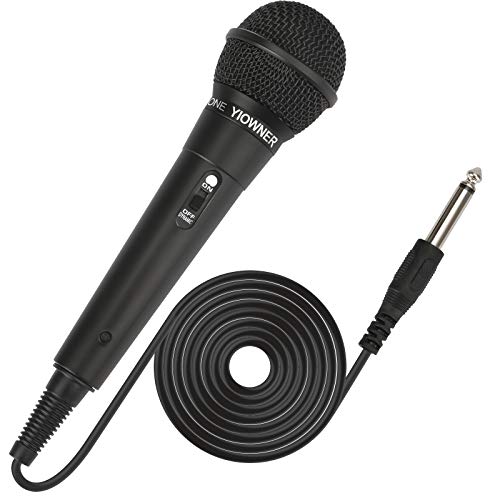
Dynamic microphones are best for karaoke because they reject background noise and resist feedback. A budget option such as the Fifine K669B USB microphone is more suited to computer use, so check how you plan to connect it. For a mixer, choose an XLR dynamic microphone and use a reliable cable such as a Hosa XLR microphone cable. Balanced cables reduce hum and interference. Keep cable runs tidy to avoid tripping hazards.
Step 5: Set levels
- Start with the master volume low and all channels at moderate levels.
- Play the music and set a comfortable level.
- Bring up the microphone gain until your voice is clear but not distorting.
- Add a little echo or reverb, enough to flatter the voice without muddying it.
- Walk around the room and adjust speaker position and volume.
Step 6: Avoid feedback
Feedback is the squeal that happens when a microphone picks up its own sound from the speakers. Keep singers behind the speakers, point microphones away from them and lower the volume or the microphone gain if it starts. Do not cup the microphone head. A little EQ adjustment can reduce harsh frequencies.
Common mistakes
- Using a USB microphone with a mixer without checking. Match connectors to your setup.
- Setting echo too high. It makes lyrics hard to understand.
- Placing speakers behind singers. This invites feedback.
- Relying on weak laptop speakers. They will not fill a room.
- Ignoring cable management. Loose cables are a hazard.
Making the room work
Hard surfaces bounce sound around, which can cause echo and feedback. Soft furnishings such as rugs, curtains and sofas absorb sound and make vocals clearer. Place speakers at ear height if possible, and avoid corners that boost bass too much. Dim the lights a little so the screen is easy to read, and arrange seating so everyone can see the lyrics and the singer.
Building a song list
Create a shared playlist ahead of time with a mix of genres and difficulty levels. Include songs everyone can sing along to, and some that suit different vocal ranges. Allow guests to add requests, and keep a queue running so the energy stays high.
Troubleshooting common problems
There is no sound from the speakers
Check the input selection on the mixer or speaker, confirm cables are fully seated and make sure the volume and mute settings are correct. Try a different cable, and test the speakers with another source.
Lyrics and music are out of sync
Wireless connections can add a slight delay. If lyrics on the TV lag behind the audio from a Bluetooth speaker, try a wired connection or a speaker that supports low latency. Some streaming devices let you adjust audio delay in their settings.
The microphone sounds thin or too quiet
Move closer to the microphone, raise the gain and add a touch of reverb. Check that the microphone is plugged into the correct input, and that the mixer channel is not muted or turned down.
Hum or buzzing
Hum often comes from ground loops or cheap cables. Plug equipment into the same power strip, use balanced cables for microphones and keep power cords away from audio cables.
Safety and neighbors
Check that cables are routed safely and that speakers are on stable surfaces. Keep volume reasonable, and set a curfew if you live close to others. A friendly warning to neighbors goes a long way.
A simple shopping order
If you are building a setup from scratch, buy in this order: first a streaming source and a TV or tablet you already own for lyrics, then a decent speaker or pair of monitors, then microphones, and finally a mixer if you want more control. This order lets you start singing right away and add pieces only when you notice a limitation. Test everything together before guests arrive, so any problems with cables or levels are solved before the party starts.
Frequently asked questions
Do I need a mixer?
Not for a basic setup. A mixer adds control and is helpful if you want to use several microphones or effects.
Can I use my phone for lyrics?
Yes, but a TV is easier for groups to read.
What cables do I need?
That depends on your setup. Common ones include HDMI, RCA, 3.5mm and XLR. Check the inputs on your gear before buying.
How do I stop my voice sounding thin?
Add a little reverb, hold the microphone close to your mouth and avoid setting the volume too low.
Conclusion
A good home karaoke setup is simple: lyrics on a TV, solid audio and a decent microphone. Start with a basic arrangement and add a mixer or better speakers as you learn what you like. Keep levels balanced, manage feedback and enjoy the singing.
As an Amazon Associate we earn from qualifying purchases.
More from Amazon
Programs that pair well with the guide above. Offers and eligibility are set by Amazon and may change.
Free shipping on eligible items, Prime Video and more. Eligible new members can start with a free trial.
Start a Prime free trialAudiobooks and podcasts to listen to on the go. Eligible new members can start with a free trial.
Try Audible freeAd-free music streaming. Eligible new subscribers can start with a free trial.
Try Music Unlimited freeA free business account with business pricing and bulk-buying tools for work, shop or home office.
Create a business accountAs an Amazon Associate we earn from qualifying purchases.





Write Your Review
No reviews yet. Be the first to share your experience!